ADD – Manage Engineering Projects System
30/03/2011
Team Members:
- Yoni Tserruya
- Ohad Ozer
- Kfir Schindelhaim
Page1
�
ADD – Manage Engineering Projects System
30/03/2011
Table of Contents
1. Use Cases...................................................................................................................................... 5
1.1. The Actors .............................................................................................................................. 6
1.1.1. Guest .............................................................................................................................. 6
1.1.2. Student ........................................................................................................................... 6
1.1.3. Secretary......................................................................................................................... 7
1.1.4. Advisor ............................................................................................................................ 7
1.1.5. Project Supervisor .......................................................................................................... 8
1.1.6. System Administrator ..................................................................................................... 8
1.2. Use Cases ............................................................................................................................... 9
1.1.1. Use Case 1 – Submit New Project Suggestion ................................................................ 9
1.1.2. Use Case 2 – Submit Project Registration ....................................................................10
1.1.3. Use Case 3 – Submit Report .........................................................................................11
1.1.4. Use Case 4 – Submit Extension Request ......................................................................12
1.1.5. Use Case 5 – Generate Excel Report ............................................................................13
1.1.6. Use Case 6 – Respond to Student Extension Request ..................................................14
1.1.7. Use Case 7 – Evaluate Student Report .........................................................................15
1.1.8. Use Case 8 – Respond To Project Suggestion...............................................................16
1.1.9. Use Case 9 – Add New Event To Schedule ...................................................................17
1.1.9. Use Case 10 – Add Student To Project .........................................................................18
2. Data Model ................................................................................................................................ 19
2.1. Description Of Data Objects ................................................................................................19
2.1.1. Users .............................................................................................................................19
2.1.2. Projects .........................................................................................................................19
2.1.3. Department ..................................................................................................................20
2.1.4. Event .............................................................................................................................20
2.1.5. Messages ......................................................................................................................21
2.1.6. Request.........................................................................................................................21
2.2. Data Objects Relationships ..................................................................................................22
2.3. Databases ............................................................................................................................23
2.3.1. ERD Diagram .................................................................................................................23
Page2
�
ADD – Manage Engineering Projects System
30/03/2011
2.3.2. Description of the main tables ................................................................................26
2.3.3. Main Transaction .....................................................................................................28
3. Behavioral Analysis ....................................................................................................................30
3.1. Sequence Diagrams .............................................................................................................30
3.1.1. Sequence Diagram 1 – Submit New Project Suggestion ..............................................30
3.1.2. Sequence Diagram 2 – Submit Project Registration ....................................................31
3.1.3. Sequence Diagram 3 – Submit Report .........................................................................32
3.1.4. Sequence Diagram 4 – Submit Extension Request.......................................................33
3.1.5. Sequence Diagram 5 – Generate Excel Report.............................................................34
3.1.6. Sequence Diagram 6 – Respond to Student Extension Request ..................................35
3.1.7. Sequence Diagram 7 – Evaluate Student Report .........................................................36
3.1.8. Sequence Diagram 8 – Respond To Project Suggestion ...............................................37
3.1.9. Sequence Diagram 9 – Add New Event To Schedule ...................................................38
3.1.9. Sequence Diagram 10 – Add Student To Project .........................................................39
3.2. Events ..................................................................................................................................40
3.2.1. Role Guest Events .........................................................................................................40
3.2.2. Role Student Events .....................................................................................................40
3.2.3. Role Secretary Events ...................................................................................................41
3.2.4. Role Advisor Events ......................................................................................................41
3.2.5. Role Project Supervisor Events.....................................................................................41
3.2.6. Role System Administrator Events ...............................................................................42
3.3. States ...................................................................................................................................43
3.3.1. New Project Request ....................................................................................................43
3.3.2. Submit Report ..............................................................................................................43
4. Object Oriented Analysis ...........................................................................................................44
4.1. Class Diagram ......................................................................................................................44
4.2. Class Description..................................................................................................................45
4.3. Packages ..............................................................................................................................51
4.4. Unit Testing..........................................................................................................................52
5. System Architecture ..................................................................................................................58
5.1. Program And Data Components..........................................................................................58
Page3
�
ADD – Manage Engineering Projects System
30/03/2011
5.1. Users In The System ............................................................................................................59
6. User Interface Draft ...................................................................................................................60
6.1. Submit Nomination for Suggested Project ..........................................................................60
6.2. Submit External Project Suggestion ....................................................................................62
6.3. Submit Project Suggestion...................................................................................................63
6.4. Application Main Screen......................................................................................................64
7. Testing ........................................................................................................................................ 65
8. Task List ...................................................................................................................................... 66
Page4
�
ADD – Manage Engineering Projects System
1.
30/03/2011
Use Cases
Page5
�
ADD – Manage Engineering Projects System
30/03/2011
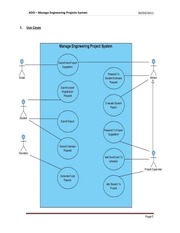
1.1. The Actors
User Profiles – The Actors
In this section we will define the external actors. The actors are, actually, the
types of accounts (aka roles) the system offer to use. Each account type canbe
attached to arbitrary number of concrete accounts (actual living system users).
1.1.1. Guest
The Guest user is the default role the system offer to use and the type of
role being operated immediately when an HTTP connection is being
established between the server and an Internet browser client.
-
The Guest’s major functionalities are:
Navigate the system and go all over its menus and sub-menus.
-
Observing global information such as Photos and broadcasted massages.
-
Use the search engine to locate past or present projects and view some
global details about them.
-
Submitting a ne project suggestion (as an external project initiator)
-
Login to the system as another user
1.1.2 Student
The Student user represents a regular Ben-Gurion student whichhas (by
demands) reached his 4th year of his engineering degree and achieved the
minimum amount of academic credit points to begin his final project.
-
The Student’s major functionalities are:
Requesting to register (optionally as a group along with some other
students) to some suggested project.
-
Submitting files and reports regarding his project.
-
Reading personal messages.
Page6
�
ADD – Manage Engineering Projects System
-
Updating project abstract
-
Viewing his group’s grades and reports feedbacks/logs
-
Submitting project requests (i.e. delay request)
30/03/2011
1.1.3 Secretary
The role that represents a faculty secretary. Secretary is the only system
role that has the permissions to view allstudents grades from the current
department.
-
The Secretary’s major functionalities are:
Observing students projects and grades.
-
Generating reports (Excel) by giving some parameters.
1.1.4 Advisor
The Advisor role represents a lecturer that can take charge of projects. By
being in charge of a students group project means, inter alia, receiving
reports and updates regarding the current project and grading it
accordingly.
-
The Advisor’s major functionalities are:
Add project suggestions and approve/reject studentsregistration requests
about it.
-
Receive reports and students requests and reply about them.
-
Appoint a sub-advisor for the current project.
Page7
�
ADD – Manage Engineering Projects System
30/03/2011
1.1.5 Project Supervisor
The Project Supervisor role represents a person in charge by the
department to oversee all the departmental regular advisor. In general a
person which serves as a project supervisor can be an advisor for some
projects.
The Project Supervisor’s major functionalities are:
- Undo some Advisors or project approval. Remove a student from a certain
project or add one.
- Edit projects schedule
- Update system permissions
- View some projects statistics
- Switch his role, temporarily, to another user just to observe his work desk
- Edit the global information section of the system
1.1.6 System Administrator
The System Administrator role represents a root user. Although most of the
administrative functionalities are related to the Project Supervisor role, this
role is needed to get things started
-
The System Administrator’s major functionalities are:
Set a regular department member as a Project Supervisor.
Import BGU users details from the Main university database into the
system
Page8
�
ADD – Manage Engineering Projects System
30/03/2011
1.2. Use Cases:
1.2.1. Use Case 1: Submit New Project Suggestion
Primary Actor: Guest, Advisor
Stockholders and Interests:
Guest: Wants to (as an external project initiator) post a new project
suggestion for groups of students to view and register.
Advisor: Wants to post a new project suggestion with him as this projects
advisor
Pre-Conditions:
The user is inside the system (if it’s an advisor then he is logged in)
Post-Conditions:
A new Project suggestion was successfully added to the system
Main Success Scenario:
1. Guest/Advisor inserts a new project suggestion parameters (project
description, number of students, …)
2. System checks if this user is an Advisor, and if so fills the advisor field
with the information of this advisor
3. System saves this new suggestion in the database
Page9
�
ADD – Manage Engineering Projects System
30/03/2011
1.2.2. Use Case 2: Submit Project Registration
Primary Actor: Student
Stakeholders and Interests: Student wants to submit a request for
project registration.
Preconditions: A project suggestion was added to the system by the
departmental supervisor.
Post Conditions: New project’s registration request was added to the
system.
Main Success Scenario:
1. Student selects a project suggestion.
2. Add his partner’s Ids
3. Approve the submission.
Extensions (Alternatives):
1. Partners for the project should be available (Haven’t approved
to another project by the supervisor).
Page10
�
ADD – Manage Engineering Projects System
30/03/2011
1.2.3. Use Case 3: Submit Report
Primary Actor: Student
Stakeholders and Interests: Student submits a report to the system.
Preconditions: Report event existed in the system.
Post Conditions: Student report was added to the system.
Main Success Scenario:
1. Student selects a report type.
2. Choose file to upload
3. Approve the submission.
Extensions (Alternatives):
1. File should not be too large.
Page11
�
ADD – Manage Engineering Projects System
30/03/2011
1.2.4. Use Case 4:Submit Extension Request
Primary Actor:Student
Stakeholders and Interests: Student submits an extension request for a
concrete report to the system.
Preconditions: Report event existed in the system.
Post Conditions: Student extension request was added to the system.
Main Success Scenario:
1. Student selects a report type
2. Submit an extension request
Page12
�
ADD – Manage Engineering Projects System
30/03/2011
1.2.5. Use Case 5: Generate Excel Report
Primary Actor: Secretary
Stockholders and Interests:
Secretary: Wants to export data that comes out of a query to an Excel
report.
Pre-Conditions:
1. The Secretary is logged in the system.
2. The report parameters are valid.
Post-Conditions:
A new Excel report is being generated
Main Success Scenario:
1. Secretary choose the desired type of report to genertate
2. Secretary inserts the relevant parameters for the chosen report
3. The System runs a query & generates the report as an Excel file
Extensions (Alternatives):
2. Secretary enters some invalid parameter (i.e. year = ‘abc’)
2.1. Display error message to screen
2.2. Goto step 2
Page13
�
ADD – Manage Engineering Projects System
30/03/2011
1.2.6. Use Case 6: Respond To Student Extension Request
Primary Actor: Advisor
Stockholders and Interests: Advisor wants to reply to a group of students
extension request (approve it or reject it).
Pre-Conditions:
1. The Advisor is logged in to the system
2. The extension request, req, is valid
Post-Conditions:
The extension request, req, is rejected or approved on system (if
approved then the relevant project schedule is updated)
Main Success Scenario:
1. Advisor draws the request’s project information from the system
2. Advisor response to the request:
2.1. If approved
2.1.1 project schedule updated
2.1.2 approve message is sent to group of students
2.2. if rejected
2.2.1 rejection message is sent to group of students
Page14
�
ADD – Manage Engineering Projects System
30/03/2011
1.2.7. Use-case 7: Evaluate Student Report
Primary Actor: Advisor
Stockholders and Interests:Advisor wants to grade the report or return
report correction request.
Pre-Conditions:
A report has been submitted to the advisor.
Post-Conditions:
The report was evaluated and graded or asked to be fixed.
Main Success Scenario:
1. Advisor downloads the request’s project information from the system.
2. Advisor response to the request:
2.1. No need to correct the report
2.1.1Evaluate the report and grade it
2.1.2 Send email to the project students
2.2. If a correction is needed
2.2.1. Send the report with the advisor remarks
2.2.2. Send email correction requestto each student in the project
Page15
�
ADD – Manage Engineering Projects System
30/03/2011
1.2.8. Use-Case 8: Respond To Project Suggestion
Primary Actors: Project Supervisor
Stockholders and Interests:The user that suggested the project is interest
in the project supervisor respond. Any guest or Advisor might suggest
new project, the suggestion waits for project supervisor approve /
denied.
Precondition: A new project suggestion has been added to the system
and waiting for project supervisor respond.
Post condition: If the supervisor approves the suggestion, a new project
suggestion will be added to the database. The supervisor respond will be
sent to the suggestion email.
Main Success Scenario:
1. The supervisor approved the suggestion.
2. The new project added to the database.
3. E-mail will be sent to the user that suggested the project.
Page16
�
ADD – Manage Engineering Projects System
30/03/2011
1.2.9. Use-Case 9:Add New Event to Schedule
Primary Actors: Project Supervisor
Stockholders and Interests:Each existing project will be update according
to the new event date.
Precondition:The project supervisor is log in to the system.
Post condition:After the addition, each project in the system will be
update: if the event is already exist, the system will check if the new date
if larger than the existing date and set the larger.
Main Success Scenario:
1. The supervisor add new event.
2. Each event date will be update to the new date except is the existing
date is larger than the new date.
3. An updated UI is view to the project supervisor.
Page17
�
ADD – Manage Engineering Projects System
30/03/2011
1.2.10. Use-Case 10: Add Student to Project
Primary Actors: Project Supervisor
Stockholders and Interests:The added students that will be update to the
project, the rest of the students in the project.
Precondition:The projectdefined in the system as a suggested project.
Post condition: After the addition, the student attributed to the system
and the system delete the student from each other project that the
student suggested himself.
Main Success Scenario:
1. The supervisor add new student to a project.
2. The student attribute to the project.
3. The student deleted from each other project that the student
suggested himself.
Page18
�
ADD – Manage Engineering Projects System
30/03/2011
2. Data Model
2.1. Description of Data Objects
2.1.1. Users
Represent all the user entities in the system. Each user has different
permissions and different UI after the log in.
2.1.2. Projects
Represent the Projects in the system.
Page19
�
ADD – Manage Engineering Projects System
30/03/2011
2.1.3. Department
Represent the Departments entities in the system.
2.1.4. Event
Represent a schedule event.
Each department on each year/semester has a sequence of events which
represent all the projects demands.
Page20
�
ADD – Manage Engineering Projects System
30/03/2011
2.1.5. Messages
Represent the messages in the system.
Each user can received an system messages.
2.1.6. Request
Represent a student request in the system.
Page21
�
ADD – Manage Engineering Projects System
2.2.
30/03/2011
Data Objects Relationships
Page22
�
ADD – Manage Engineering Projects System
30/03/2011
2.3. Databases
2.3.1. ERD Diagram
2.3.1.1. First part
Page23
�
ADD – Manage Engineering Projects System
30/03/2011
2.3.1.2. Second part
Page24
�
ADD – Manage Engineering Projects System
2.3.1.3.
30/03/2011
Third part
Page25
�
ADD – Manage Engineering Projects System
30/03/2011
2.3.2. Description of the main tables:
* Underline = Primary Key,
* Gray = Foreign Key.
2.3.2.1.
Student (ID, Name, Group_ID, Department_ID)
Represent the Student entity in the system.
2.3.2.2.
Group(ID, Name)
Each student belongs toone group, and each group performs one
project only.
2.3.2.3.
Staff (ID, Name, Department_ID, Role_ID, Supervisor)
Represent the staff members in the system. Each one has one role,
and can be supervisor of his department.
2.3.2.4.
Role (ID, Description)
Represent the staff members role.
2.3.2.5.
Outside Projects (ID, Description)
Represent an outside suggestion for projects.
Every guest in the system can suggest a project to each department,
and the department’s supervisor can approved it or reject it. An
approved outside project will become an suggested project for the
department’s students.
2.3.2.6.
Suggested Project (ID, Staff_ID, Department_ID, Description)
Represent an suggestion for project, which students can register as
candidates, and the supervisor can approve or reject their nominate
2.3.2.7.
Suggested To Groups (Suggested_Project_ID, Group_ID)
Represent group registration for a suggested project. Each group
can register to more the on suggested project, and each suggested
project allows to more the one group to register. Only one group
can finally perform the project, according to the supervisor approval
and the outside company agreement.
Page26
�
ADD – Manage Engineering Projects System
30/03/2011
2.3.2.8.
Approved Project (ID, Department_ID, Group_ID, Name,
Description)
Represent an approved suggestion project, to a specific group of
students. Each group has one approved project which the perform
on their 4th year in their studies.
2.3.2.9.
Staff To Approve (Staff_ID, Approve_ID)
Each approved project has one or more staff members related with
(Advisor, Supervisor)
2.3.2.10. Event (Department_ID,Year,Semester,Event_ID, Mandatory, Date)
Each department’s project has annual events whichare the
components of the project in general. For example: ARD document
in our department is represented as an event. Each semester the
supervisor will decide what is going to be the events for the
following semester.
2.3.2.11. Approved To
Event(Department_ID,Year,Semester,Event_ID,Approved_Project_I
D, Due_Date, Attachment_ID , Description)
Each approved project has it’s specific events, which in general
derived from the general events. But for example if a group gets an
extension, it’s should have another record in the database.
2.3.2.12. Personl Message To Student (ID, Student_ID, Title, Body, Date,
Read)
Represent a personal message to a student.
2.3.2.13. Personal Message To Staff (ID, Saff_ID, Title, Body, Date, Read)
Represent a personal message to staff member.
2.3.2.14. Boradcast Message (ID, Department_ID, Title, Body, Date,
Group_Type)
Represent a broadcast message to a department. The group type
can be (All, Staff only, Students only)
Page27
�
ADD – Manage Engineering Projects System
30/03/2011
2.3.3. Main Transaction
2.3.3.1.
Name: Suggested Project Addition
Description: Supervisor or Advisor adding new Suggested Project to
the system.
Affected Table: Suggested Projects
Added Fields: All, add new entry
2.3.3.2.
Name: Registration to Project
Description: Student registers to a suggested project. First he must
register a new group, and than can register to suggested project as
a group.
Affected Table: Group, Suggested_To_Students
Added Fields: Add new entry once to the Group table, and than to
the Suggested_To_Students. Group can register to more than one
suggested project.
2.3.3.3.
Name:Approves Project
Description:Supervisor approves group registration to a suggested
project.
Affected Table: Approved Projects, Suggested Projects,
Suggested_To_Students
Added Fields:Add new entry to Approved Projects
Deleted Fields: Delete the suggested project.
Update Fields: Rejects all the other Suggested_To_Student with the
same Sugested_ID
2.3.3.4.
Name: Create Annual Events
Description: The supervisor, create in the beginning of each
year/semester the annual events for his departments.
Affected Table: Events, Approved_To_Events
Added Fields:Add new entries to the Events table, and for each
Approved project, create it’s unique entries in the
Approvred_To_Events table.
Page28
�
ADD – Manage Engineering Projects System
30/03/2011
2.3.3.5.
Name:Submit Event’s Task
Description: For each event, the students submit his task to the
system
Affected Table:Approved_To_Events
Update fields:Add new files to the file-server, and update the
Attachmet_ID in the Approved_To_Events filed.
2.3.3.6.
Name:Register to the system
Description:Each student and staff member should register to the
system with their BGU identity
Affected Table: Students, Staff
Added fields: Add new entry to the Students/Staff table
2.3.3.7.
Name:Send Broadcast Message
Description:Supervisor send broadcast message (All the members,
students only or staff only)
Affected Table:Broadcast Messages
Added fields: Add new entry to the Broadcast Messages table
2.3.3.8.
Name:Send Personal Message
Description:Staff member send personal message to a student,
student group or other staff member
Affected Table:Personal_Message_To_Student,
Personal_Message_To_Staff
Added fields:Add new entry to the matching table
2.3.3.9.
Name:Send Outside Suggestion Project
Description:Company send threw the system website an suggestion
for the project
Affected Table:Outside_Projects
Affected Fields:Add new entry to theOutside_Projects table
Page29
�
ADD – Manage Engineering Projects System
30/03/2011
3. Behavioral Analysis
This section describes the flow control of the system.
3.1. Sequence Diagrams
For each Use-Case that described in section 1, a corresponding sequence
diagram described in this section. Each sequence diagram describes the
required methods and the exact sequence of the methods.
3.1.1. Sequence Diagram 1: Submit New Project Suggestion
Page30
�
ADD – Manage Engineering Projects System
30/03/2011
3.1.2. Sequence Diagram 2: Submit Project Registration
Page31
�
ADD – Manage Engineering Projects System
30/03/2011
3.1.3. Sequence Diagram 3: Submit Report
Page32
�
ADD – Manage Engineering Projects System
30/03/2011
3.1.4. Sequence Diagram 4: Submit Extension Request
Page33
�
ADD – Manage Engineering Projects System
30/03/2011
3.1.5. Sequence Diagram 5: Generate Excel Report
Page34
�
ADD – Manage Engineering Projects System
30/03/2011
3.1.6. Sequence Diagram 6: Respond To Student Extension Request
Page35
�
ADD – Manage Engineering Projects System
30/03/2011
3.1.7. Sequence Diagram 7:Evaluate Student Report
Page36
�
ADD – Manage Engineering Projects System
30/03/2011
3.1.8. Sequence Diagram 8:Respond To Project Suggestion
Page37
�
ADD – Manage Engineering Projects System
30/03/2011
3.1.9. Sequence Diagram 9:Add New Event to Schedule
Page38
�
ADD – Manage Engineering Projects System
30/03/2011
3.1.10. Sequence Diagram 10:Add Student to Project
Page39
�
ADD – Manage Engineering Projects System
30/03/2011
3.2. Events
This section describes the events in the system, means the operations per Actor
in the system, and for each event, it describes the behavioral in the system. The
events divided to the users in the system: guest, student, advisor, supervisor,
secretary.
3.2.1. Role Guest Events
Func#
Requirement Name
Behavioral In the System
1
Observe prev/current projects
Gets all the previous projects from the DB
Submit a new project
Create new instance of external suggested project
suggestion
The instance is waiting for approve / decline by the supervisor
2
Search for projects in the SQL server according to given
3
Search for projects
parameters.
Send request to BGU servers with a username and password
4
Login to system
If a succeeded, the screen of the user role appears.
3.2.2. Role Student Events
Func#
Requirement Name
Behavioral In the System
Submit project registration
1
Send request to the advisor of the project
request
Submit the document to the event
2
Submit report
The advisor can download the file
The request sends to the advisor of the project.
3
Submit extension request
The advisor may approve / decline the request.
4
Read personal massages
Gets all the messages the sent to the student
Page40
�
ADD – Manage Engineering Projects System
30/03/2011
3.2.3. Role Secretary Events
Func#
Requirement Name
Behavioral In the System
1
Observe Students projects
Gets the projects in the system, and views the project details.
2
Generate Excel’s reports
Gets the reports in the system, and transfer it to Excel file
3.2.4. Role Advisor Events
Func#
Requirement Name
1
Add new project suggestion
Behavioral In the System
The projects added automatically to the suggested projects
table.
Connect group of students to a suggested project.
2
Approve students request
The project becomes approved project
3
Receive students reports
Gets student report file.
4
Evaluate student report
Set the report grade.
5
Accept extension requests
Get all extension requests that relevant to the advisor, and
allow the advisor to approve / decline them
6
Read inbox messages
7
Add sub-adviser
Get all the messages that sent to the advisor
Add another staff member to be a sub-advisor for a specific
project.
3.2.5. Role Project Supervisor Events
Func#
Requirement Name
Behavioral In the System
Get all project suggestions, for each one decide to approve or
1
Respond to project suggestion
decline. If the project approved, it becomes suggested project
so the students may send registration request for it.
2
Add a new event to schedule
Add a new event to the overall schedule of this department
Page41
�
ADD – Manage Engineering Projects System
30/03/2011
project procedure. This event added to all projects schedule.
Confirm or reject an extension request sent by a student and
Respond to an extension
3
approved by the advisor. If the request approved by the
request
supervisor, then the request deadline updated.
4
Add students to project
Add specific student to a project group
5
Send mail to group of students
Send a message to the inbox of student / stuff members
6
Statistics
Read data from the data base and view reports
7
Update user permission
Change the permission of the user in the Data base
3.2.6. Role System Administrator Events
Func#
Requirement Name
1
Set a departmental supervisor
Behavioral In the System
Set a stuff member to be a project supervisor of his
department
Import users from BGU servers to the data base of the
2
Import users from BGU servers
system
Page42
�
ADD – Manage Engineering Projects System
30/03/2011
3.3. States
3.3.1. New Project Request
3.3.2. Submit Report
Page43
�
ADD – Manage Engineering Projects System
30/03/2011
4. Object-Oriented Analysis
4.1. Class Diagrams:
Page44
�
ADD – Manage Engineering Projects System
30/03/2011
4.2. Class Description
4.2.1. User (Abstract)
4.2.1.1.
Description:
This class represents the abstract type user which acts as the super-role for
every type of user able to log into the system and perform some kind of
functionality in it.
The class itself includes some basic information every role shares, for
example: and ID (Unique), first name, last name, …
also some functionality which is common to all system’s role is implemented
as a method of this class (like reading messages for example)
4.2.1.2.
Main Methods:
4.2.1.2.1.
Object getMessages()
4.2.1.2.1.1. Pre Conditions:
4.2.1.2.1.1.1. This User belongs to a one & only one Department
4.2.1.2.1.2. Post Conditions:
4.2.1.2.1.2.1. All the messages which is relevant to this user (were
broadcasted to his department or sent personally to him)
were encapsulated and returned as one object
4.2.1.2.1.3. Extra Information:
This method is implemented by retrieving every personal
message which has been sent to this user (by query) and then
adding to the same data structure all the broadcast messages
sent to this user’s department (another query). Results sorted by
sent date.
4.2.2. Student
4.2.2.1.
Description:
This class is a sub-class of the abstract User class and represents a user of
type student in the system. In addition to the basic attributes and
functionality of a simple user it includes a students content, i.e. academic
average grade, sum of all academic credit points, ..
most of a students functionality is done through a student’s group.
Page45
�
ADD – Manage Engineering Projects System
30/03/2011
4.2.2.2.
Main Methods:
4.2.2.2.1.
Boolean createGroup(String name)
4.2.2.2.1.1. Pre Conditions:
4.2.2.2.1.1.1. This student is not a member of any student’s group
4.2.2.2.1.1.2. A group with the given name does not exist
4.2.2.2.1.2. Post Conditions:
4.2.2.2.1.2.1. A group with the given name is created, this student is
now its only member, and true is returned. Else false is
returned
4.2.3. StudentsGroup
4.2.3.1.
Description:
This class represents a group of students (one or more, not upper bounded).
The students, as a group, can perform some of the main functionalities of the
system like submitting candidacy for a project or submitting requests,
reports, or accomplishing events.
4.2.3.2.
Main Methods:
4.2.3.2.1.
Boolean submitProjectCandidacy(SuggestedProject p)
4.2.3.2.1.1. Pre Conditions:
4.2.3.2.1.1.1. P is a valid SuddestedProject
4.2.3.2.1.1.2. This studentsGroup does not exceed in number of
students then the number allowed for the project p
4.2.3.2.1.2. Post Conditions:
4.2.3.2.1.2.1. True is returned if a new candidacy been submitted,
false otherwise
4.2.3.2.2.
Void submitRequest(String description)
4.2.3.2.2.1. Pre Conditions:
4.2.3.2.2.1.1. This studentsGroup is attached with a valid project as a
performing group
4.2.3.2.2.2. Post Conditions:
4.2.3.2.2.2.1. A new request is sent to the primary advisor of the
project his studentsGroup is performing
4.2.3.2.3.
Boolean addStudent(Student s)
4.2.3.2.3.1. Pre Conditions:
4.2.3.2.3.1.1. s is a valid student
4.2.3.2.3.1.2. s is not a member of any group
Page46
�
ADD – Manage Engineering Projects System
30/03/2011
4.2.3.2.3.1.3. if this studentsGroup is already attached with a project
then its amount of students is smaller then the maximum
allowed for the attached project
4.2.3.2.3.2. Post Conditions:
4.2.3.2.3.2.1. True is returned if the given student has been added to
this group, otherwise false is returned
4.2.4. Advisor
4.2.4.1.
Description:
This class represents a user of the system which can be attached to one or
more active projects as an advisor (primary advisor or sub-advisor).
advisor has some privileges over projects he is advising, i.e. grade submitted
reports corresponding to those projects.
4.2.5. Supervisor
4.2.5.1.
Description:
Every department in the faculty of engineering at BGU should appoint at
least one advisor as a supervisor which in addition to advising active projects
got some extra administrative privileges over all active projects currently
taking part on the department he is supervising at.
in terms of object oriented it means that that the Supervisor class is a subclass of advisor and every supervisor can also regularly advise over projects
in his department.
4.2.5.2.
Main Methods:
4.2.5.2.1.
Void replyProjectCandidacy(StudentsGroup g, Project p,
Boolean decision)
4.2.5.2.1.1. Pre Conditions:
4.2.5.2.1.1.1. g is a valid StudentsGroup
4.2.5.2.1.1.2. p is a valid Project which is not assigned to any group
4.2.5.2.1.1.3. the group g contains has successfully submitted a
candidacy request over the project p
4.2.5.2.1.2. Post Conditions:
Page47
�
ADD – Manage Engineering Projects System
30/03/2011
4.2.5.2.1.2.1. This supervisor decides according to the decision
parameter and the database is being updated
correspondingly.
4.2.5.2.2.
Void replyRequest(StudentsRequest r, Boolean decision)
4.2.5.2.2.1. Pre Conditions:
4.2.5.2.2.1.1. r is a valid StudentRequest
4.2.5.2.2.1.2. r is in status of awaiting for reply by supervisor
4.2.5.2.2.2. Post Conditions:
4.2.5.2.2.2.1. A decision is being taken by the supervisor according to
the decision parameter and a personal message is being
generated and sent to all students of the relevant group
4.2.5.2.3.
Void replyExternalSuggestion(ExternalSuggestedProject s,
Boolean decision)
4.2.5.2.3.1. Pre Conditions:
4.2.5.2.3.1.1. s is a valid external project suggestion
4.2.5.2.3.2. Post Conditions:
4.2.5.2.3.2.1. This supervisor goes over the description of the external
suggestion s and decides whether to approve s (meaning to
make s a suggested project which is open for groups of
students to submit candidacy for) according to the decision
parameter
4.2.5.2.3.3. Extra Information:
If this supervisor decides to approve the given external suggested
project (s) then he must select a primary advisor for this project
from the range of advisors of the relevant department. Message
is sent to the chosen advisor.
4.2.5.2.4.
Void createEvent(Object eventDetails)
4.2.5.2.4.1. Pre Conditions:
4.2.5.2.4.1.1. eventDetails encapsulates all relevant details for a new,
unique, event which can be scheduled in every relevant
project flow (year, semester, name, description, …)
4.2.5.2.4.2. Post Conditions:
4.2.5.2.4.2.1. A new event is created for this supervisor’s department.
If the event is stated as mandatory event than every project
which is currently active is automatically scheduling it.
4.2.5.2.5.
Void createConcreteEvent(Event e, Project p, Date due_date)
4.2.5.2.5.1. Pre Conditions:
4.2.5.2.5.1.1. e is a valid event
4.2.5.2.5.1.2. p is a project taking place in the department which the
event e is defined at
Page48
�
ADD – Manage Engineering Projects System
30/03/2011
4.2.5.2.5.1.3. The schedule of p doesn’t include the event e yet for a
due_date which maintains due_date> today
4.2.5.2.5.1.4. due_date is > today
4.2.5.2.5.2. Post Conditions:
4.2.5.2.5.2.1. A concrete event is created and attaches the event e to
the active project p to be accomplish & submitted not after
the date due_date
4.2.6. Department
4.2.6.1.
Description:
This class represents a Department in the engineering faculty of BGU.
It includes some basic information of every department, i.e. ID (Unique,
academic code), name, and so. Includes some basic functionality.
4.2.7. OracleAdapter
4.2.7.1.
Description:
This class represents the adapter which allows the system communication
with the Oracle based Database of BGU’s student administration essence.
It mainly supports static functionality of connecting/disconnecting to/from
the database and running queries over it.
4.2.7.2.
Main Methods:
4.2.7.2.1.
Boolean connect(String username, String password)
4.2.7.2.1.1. Pre Conditions:
4.2.7.2.1.1.1. None
4.2.7.2.1.2. Post Conditions:
4.2.7.2.1.2.1. This method returns true if the username and password
matches according to BGU’s database and connects the
user, or false otherwise.
4.2.8. MySQLAdapter
4.2.8.1.
Description:
This class represents the adapter which allows the system communication
with the local MySQL based Database of our system.
It mainly supports static functionality of connecting/disconnecting to/from
the database and running queries over it.
Page49
�
ADD – Manage Engineering Projects System
30/03/2011
4.2.8.2.
Main Methods:
4.2.8.2.1.
Boolean connect(String username, String password)
4.2.8.2.1.1. Pre Conditions:
4.2.8.2.1.1.1. None
4.2.8.2.1.2. Post Conditions:
4.2.8.2.1.2.1. This method returns true if the username and password
matches according to the local database and connects the
user, or false otherwise.
Page50
�
 Historical archive . public document