INSTALLATION INSTRUCTIONS
1075 North Ave. Sanger, CA 93657-3539 local: 559-875-0222 fax: 559-876-2259 toll free: 800-445-3767
IMPORTANT NOTE
25001
THIS KIT GIVES YOU THE OPTION OF A 1” TO 3” DROP AS WELL AS A 1” LIFT IN ½”
INCREMENTS FOR YOUR 04-UP FORD F150 2WD.
CONGRATULATIONS!
You were selective enough to choose a BELLTECH PRODUCT. We have spent many hours
developing our line of products so that you will receive maximum performance with your
vehicle difficulty during installation
Note:
Confirm that all of the hardware listed in the parts list is in the kit. DO NOT begin this
installation if any part is missing. Read the instructions thoroughly before beginning this
installation.
Warning:
DO NOT work under a vehicle supported by only a jack. Place support stands securely
under the vehicle in the manufacturer’s specified locations unless otherwise instructed.
Warning:
hard
DO NOT drive the vehicle until all work has been completed and checked. Torque all
ware to values specified.
Reminder:
when
Proper use of safety equipment and eye/face/hand protection is absolutely necessary
using these tools to perform procedures!
Note:
Note:
It is very helpful to have an assistant available during the installation process.
We DO NOT RECOMMEND using wheel ramps while performing this installation.
RECOMMENDED TOOLS:
•Blocks and Wheel chocks
•Ratcheting Socket Wrench
•Safety Glasses
•Floor jack and Jack Stands
•Torque Wrench 10-75 lb ft. range
•Properly rated floor jacks and support stands
•Combination Wrench
•Torque wrench: 0-75 lb ft. range
•Open Wrench
1
KIT INSTALLATION
1a.
Open the hardware kit and remove all of the contents. Refer to the parts list (Page 6) to verify
that all parts are present. Do not begin work if parts are missing.
1b.
Park the vehicle on a smooth, level concrete or seasoned asphalt surface and activate the
parking brake. Block the REAR wheels of the vehicle with appropriate wheel chocks; making
sure the vehicle’s transmission is in 1st gear (manual) or “Park” (automatic).
1c.
Using a properly rated floor jack, lift the FRONT wheels of the vehicle off the ground. Place
support stands, rated for the vehicle’s weight and in the factory specified locations. Refer to the
vehicle Owner’s Manual. Prior to lowering the vehicle onto the stands, make sure the supports
will securely contact the chassis.
25001-888 V2 08/08©
A Division of KW AUTOMOTIVE North America, Inc.
1
�
1d.
It is very important that the vehicle is properly supported during this installation to prevent
personal injury and chassis damage. Make sure that the support stands are properly placed
prior to performing the following procedures. We DO NOT RECOMMEND using wheel ramps
while performing this installation.
REMOVING THE O.E.M. FRONT STRUT
2a.
Locate the top three mount bolts of the front spring/strut assembly.
2b.
Remove all three mounting nuts that attaches the top of the spring/strut assembly to the
chassis.
2c.
As you did for the top mounts, remove the bottom mounting bolt of the spring/strut assembly.
25001-888 V2 08/08©
A Division of KW AUTOMOTIVE North America, Inc.
2
�
3.
END LINK &STEERING ARM REMOVAL
3a.
Locate the end link mounts. Un-bolt the mounting nuts to the end links. Remove the end links
completely.
3b.
Locate Steering arm link at spindle. Unbolt the steering arm bolt and disconnect stud from
spindle.
4.
REMOVE THE SPRING/STRUT COMPLETELY
4a.
Once all mounts have been un-bolted, hold the spindle assembly and slightly pushing down
dislodging the bottom spring/strut assembly from its bottom mounts dislodging the
entire spring/strut assembly from its perch.
!
Coil springs may be under tension. Springs under tension store a great amount of energy. Use
caution during the following steps to avoid personal injury and/or damage to vehicle. Be careful not to
damage the brake hoses.
25001-888 V2 08/08©
A Division of KW AUTOMOTIVE North America, Inc.
3
�
PRE-ASSEMBLY OF THE STRUT
The installation pictures shown have been done at a professional installation shop.
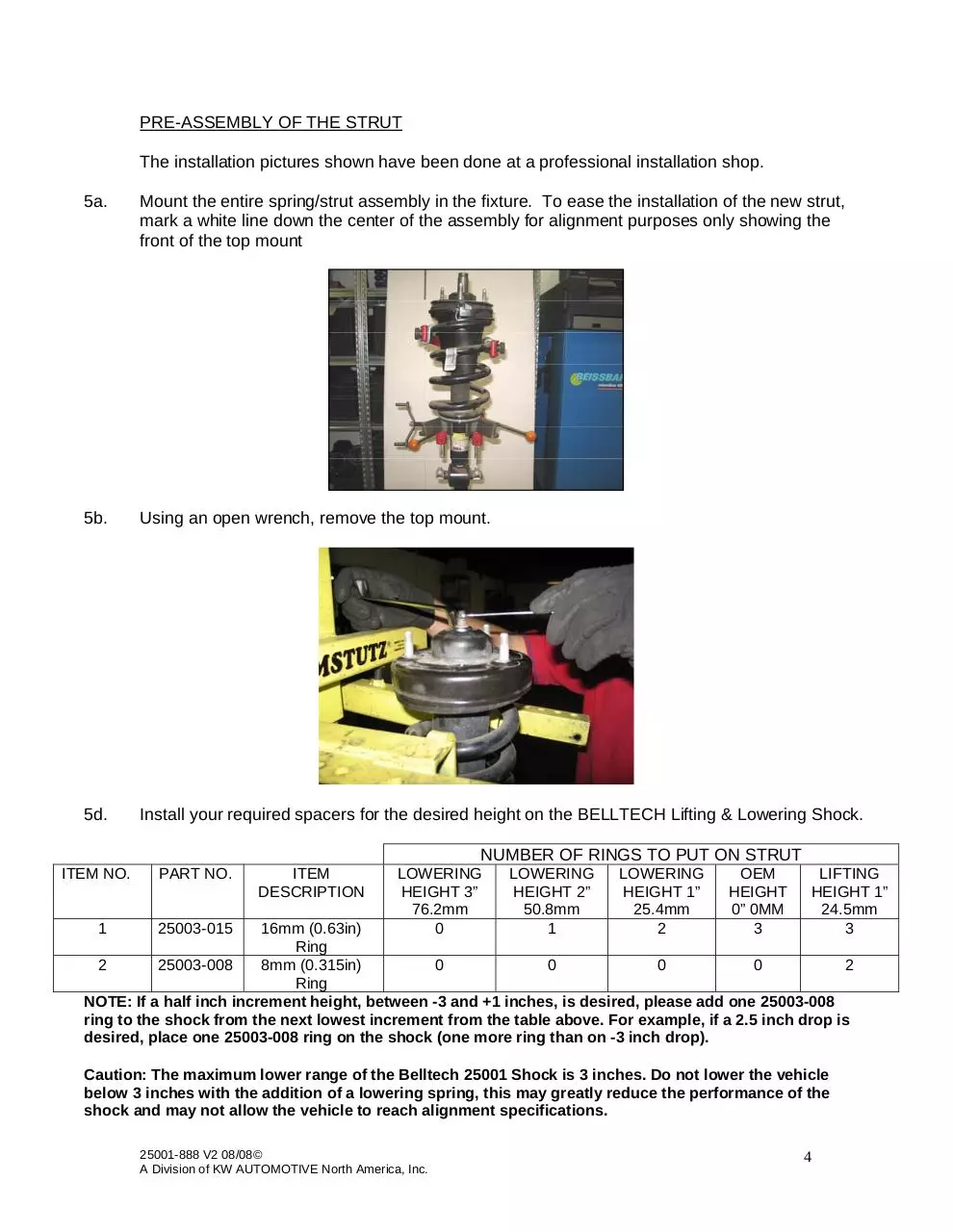
5a.
Mount the entire spring/strut assembly in the fixture. To ease the installation of the new strut,
mark a white line down the center of the assembly for alignment purposes only showing the
front of the top mount
5b.
Using an open wrench, remove the top mount.
5d.
Install your required spacers for the desired height on the BELLTECH Lifting & Lowering Shock.
NUMBER OF RINGS TO PUT ON STRUT
ITEM NO.
1
PART NO.
25003-015
ITEM
DESCRIPTION
LOWERING
HEIGHT 3”
76.2mm
0
LOWERING
HEIGHT 2”
50.8mm
1
LOWERING
HEIGHT 1”
25.4mm
2
OEM
HEIGHT
0” 0MM
3
LIFTING
HEIGHT 1”
24.5mm
3
16mm (0.63in)
Ring
2
25003-008
8mm (0.315in)
0
0
0
0
2
Ring
NOTE: If a half inch increment height, between -3 and +1 inches, is desired, please add one 25003-008
ring to the shock from the next lowest increment from the table above. For example, if a 2.5 inch drop is
desired, place one 25003-008 ring on the shock (one more ring than on -3 inch drop).
Caution: The maximum lower range of the Belltech 25001 Shock is 3 inches. Do not lower the vehicle
below 3 inches with the addition of a lowering spring, this may greatly reduce the performance of the
shock and may not allow the vehicle to reach alignment specifications.
25001-888 V2 08/08©
A Division of KW AUTOMOTIVE North America, Inc.
4
�
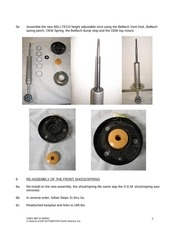
5e.
Assemble the new BELLTECH height adjustable strut using the Belltech Vent Disk, Belltech
spring perch, OEM Spring, the Belltech bump stop and the OEM top mount.
6.
RE-ASSEMBLY OF THE FRONT SHOCK/SPRING
6a.
Re-install on the new assembly, the shock/spring the same way the O.E.M. shock/spring was
removed.
6b.
In reverse order, follow Steps 2c thru 2a.
6c.
Reattached swaybar end links to 18ft-lbs.
25001-888 V2 08/08©
A Division of KW AUTOMOTIVE North America, Inc.
5
�
7.
FINALIZING THE INSTALLATION
7a.
All hardware being fastened to the vehicle’s original fastening points should be torqued
to the proper specifications. To prevent chassis damage, never over-torque the hardware.
Check that all components and fasteners have been properly installed, tightened and torqued.
7b.
Check brake hoses and other components for any possible interference.
7c.
Lift the vehicle and remove the support stands. Carefully lower the vehicle to the ground.
7d.
Immediately test-drive the vehicle in a remote location so that you can become accustomed to
the revised driving characteristics and handling. Be aware that the vehicle will handle
substantially different now that it has been modified.
7e.
Installation is complete. Check all of the hardware and re-torque at intervals for the first 10,
100, 1000 miles.
PART NUMBER
25001-001
25003-016
25003-008
4927-001
65210031
DESCRIPTION
Shock
Spacer
Spacer
Bump Stop
Vent Disk
25001-888 V2 08/08©
A Division of KW AUTOMOTIVE North America, Inc.
QTY
1
3
2
1
1
6
�
ALIGNMENT INSTRUCTIONS For 2”- 3” Lowering
IMPORTANT NOTE:
! This process is not normally needed for the Belltech 2” drop but is recommended for use with
the Belltech 3” drop coil springs allowing for additional adjustment to obtain proper alignment.
LENGTHENING THE ALIGNMENT SLOT
1. Remove the bolts from the lower control arm using a 21mm & 27mm wrench and or socket.
2. Pull the lower control arms down and out of the way to allow for a working area within the slotted
holes (photo 1).
3. Insert a stock bolt in the slot locations on the lower control arm mount, position the bolt against inner
slot side then scribe a line along the bolt flange (Photo 2). It is helpful to outline the profile so it can be
easily fallowed while cutting (Photo 3). Perform this marking technique on all eight slots.
4. Using a die grinder and carbide metal cutting bit remove the material outlined as preformed in step 3
(Photo 4). Photo 5 shows proper material removal.
5. Once all the holes have been slotted remove any burrs then reattach the lower control arms.
1
3
2
4
5
25001-888 V2 08/08©
A Division of KW AUTOMOTIVE North America, Inc.
7
�
 Historical archive . public document