SOFTWARE METRICS:
TOWARD BUILDING PROXY MODELS
A Paper
Submitted to the Graduate Faculty
of the
North Dakota State University
of Agriculture and Applied Science
By
Izzat Mahmoud Alsmadi
In Partial Fulfillment of the Requirements
for the Degree of
MASTER OF SCIENCE
Major Department:
Computer Science
April 2006
Fargo, North Dakota
i
�
NORTH DAKOTA STATE UNIVERSITY
Graduate School
Title
Software Metrics: Toward building proxy models.
By
Izzat M Alsmadi
The supervisory Committee certifies that this disquisition complies with North Dakota
State University’s regulations and meets accepted standards for the degree of
Master of Software Engineering
SUPERVISORY COMMITTEE
Chair
Approved by Department chair :
------------------------------------Date
--------------------------------------------Signature
ii
�
ABSTRACT
Alsmadi, Izzat Mahmoud, M.S., Department of Computer Science, College of Science and
Mathematics, North Dakota State University, April 2006. Software Metrics: Toward
Building Proxy Models. Major Professor: Dr. Kenneth Magel.
The purpose of software metrics is to obtain better measurements in terms of risk
management, reliability prediction, cost containment, project scheduling, and improving
the overall software quality. Metric tools achieve this by gathering and analyzing the
software or the application through a metric tool. This paper describes the process to
develop a software metric. It summarizes the different documents of the software
development stages. It also describes the product developed. This application is developed
specifically for Honeywell’s aviation division. Honeywell uses Activity Based
Management (ABM) to estimate, track, and manage software projects. ABM requires
estimating code by size, in other words, to use lines of code (LOC) or statement lines of
code (SLOC) as the basic metrics for predicting software development cost. Metrics assist
the process of reverse engineering. The information gathered by those metrics can be used
to build a classification model or some formulas that can be used for future predictions.
The tool will help us define the requirements for such models. Those models can be used
for similar projects in the same industry field
iii
�
TABLE OF CONTENTS
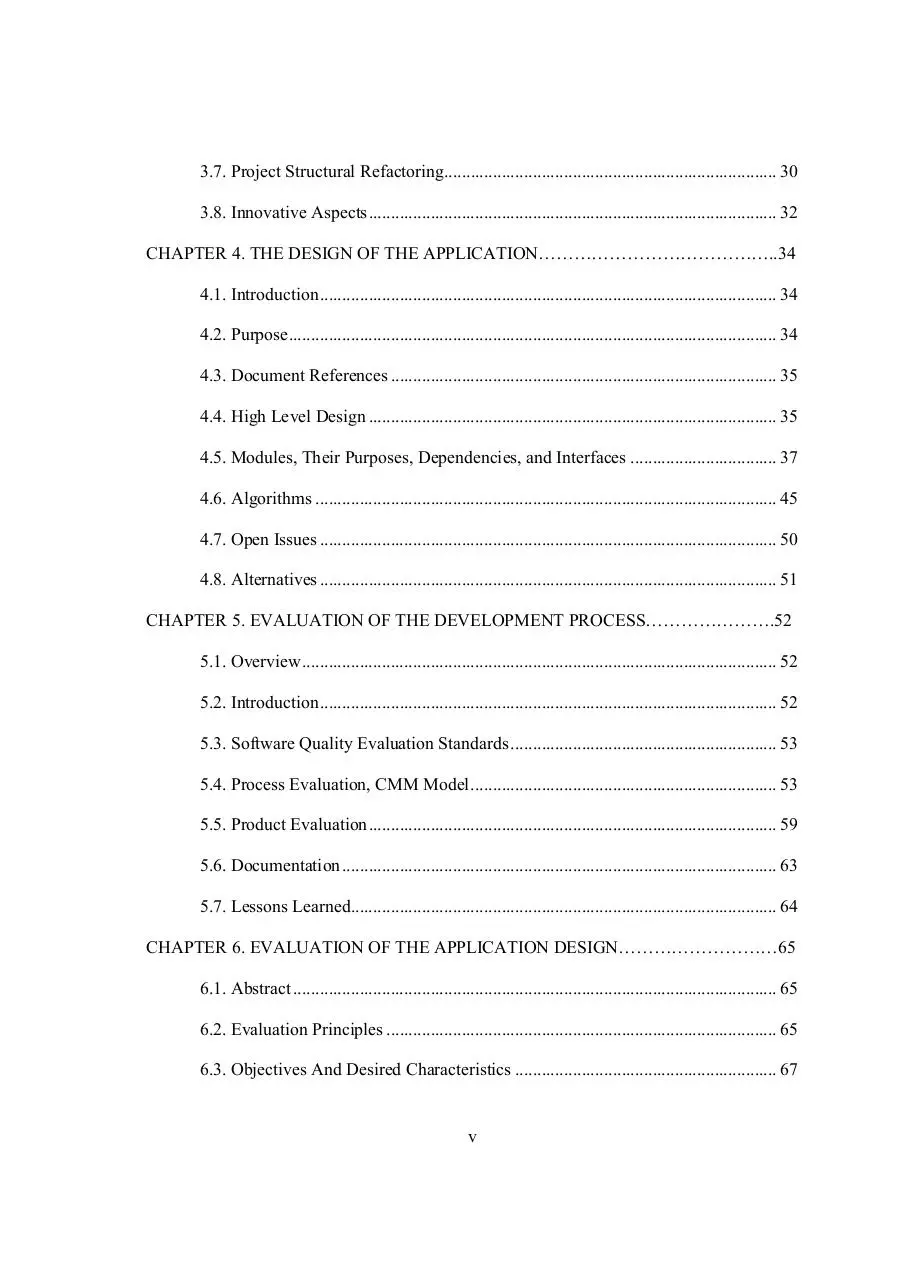
ABSTRACT………………………………………………………………………………..iii
LIST OF TABLES…………………………………………………………………………vii
LIST OF FIGURES………………………………………………………...……….…….viii
CHAPTER 1. INTRODUCTION………………………………………………………….. .1
1.1. Problem Definition.............................................................................................. 1
1.2. Approach............................................................................................................. 4
1.3. Related Work ...................................................................................................... 5
1.4. Innovations.......................................................................................................... 9
1.5. Contributions..................................................................................................... 10
CHAPTER 2. BRIEF USER MANUAL FOR THE APPLICATION…………………….11
2.1. Introduction....................................................................................................... 11
2.2. Functionalities................................................................................................... 11
2.3. Hardware And Software Requirements ............................................................ 11
2.4. Setup and Installation........................................................................................ 12
2.5. Performing a Standard Run............................................................................... 12
CHAPTER 3. THE DEVELOPMENT PROCESS………………………………………...17
3.1. Challenges......................................................................................................... 17
3.2. Initial Document ............................................................................................... 18
3.3. The Iterative Process......................................................................................... 22
3.4. The Parser ......................................................................................................... 23
3.5. Testing............................................................................................................... 24
3.6. Process Evolution.............................................................................................. 25
iv
�
3.7. Project Structural Refactoring........................................................................... 30
3.8. Innovative Aspects............................................................................................ 32
CHAPTER 4. THE DESIGN OF THE APPLICATION…………………………………..34
4.1. Introduction....................................................................................................... 34
4.2. Purpose.............................................................................................................. 34
4.3. Document References ....................................................................................... 35
4.4. High Level Design ............................................................................................ 35
4.5. Modules, Their Purposes, Dependencies, and Interfaces ................................. 37
4.6. Algorithms ........................................................................................................ 45
4.7. Open Issues ....................................................................................................... 50
4.8. Alternatives ....................................................................................................... 51
CHAPTER 5. EVALUATION OF THE DEVELOPMENT PROCESS………………….52
5.1. Overview........................................................................................................... 52
5.2. Introduction....................................................................................................... 52
5.3. Software Quality Evaluation Standards ............................................................ 53
5.4. Process Evaluation, CMM Model..................................................................... 53
5.5. Product Evaluation............................................................................................ 59
5.6. Documentation.................................................................................................. 63
5.7. Lessons Learned................................................................................................ 64
CHAPTER 6. EVALUATION OF THE APPLICATION DESIGN………………………65
6.1. Abstract ............................................................................................................. 65
6.2. Evaluation Principles ........................................................................................ 65
6.3. Objectives And Desired Characteristics ........................................................... 67
v
�
6.4. Design Evaluation Techniques or Mechanisms................................................ 71
6.5. Design Variability............................................................................................. 76
CHAPTER 7. TESTING…………………………………………………………………...78
7.1. Introduction....................................................................................................... 78
7.2. Test Strategies................................................................................................... 78
7.3. Test Cases ......................................................................................................... 80
7.4. Regression Testing............................................................................................ 93
7.5. User or Acceptance Tests.................................................................................. 93
7.6. Performance and Robustness Test .................................................................... 93
7.7. Installation Test................................................................................................. 94
7.8. Summary ........................................................................................................... 94
CHAPTER 8. CONCLUSIONS…………………………………………………………...96
8.1. What Could Have Been Done Better? .............................................................. 96
8.2. Description........................................................................................................ 97
8.3. Software Mining ............................................................................................... 98
REFERENCES CITED…………………………………………………………………….99
vi
�
LIST OF TABLES
Table
Page
1.1. Simple ABM model…………………………………………..……………………….. 2
3.1. The Commit matrix……………………………………..……………………………. 20
4.1. Reference documents ……………………………..…………………………………..35
6.1. Some software design metrics [31]…………...……………………………………… 75
8.1. Project summary ………………………..………………………………………….... 96
vii
�
LIST OF FIGURES
Page
Figure
1.1. NMU/Hour graph……………………………………………………………………… 4
2.1. SWMetrics main window GUI……………………...……………………………….. 12
2.2. Saving metric to a file……………………………………...………………………… 13
2.3. Running SWMetrics.exe screenshot (Windows version)………...………………….. 14
2.4. Running SWCMetrics.exe screenshot (Console version)...……………...……………15
2.5. The Excel parsed file screenshot……………………………………………………... 16
3.1. Code sample with some metrics demonstration……………………………………… 24
3.2. Prototype evolution…………………………………………………………………... 26
3.3. The Scrum process [7]………………………………………………………...……... 28
3.4. High-level component diagram………………………………………………………. 31
3.5. Classes’ interaction activity diagram……………………………………………….... 32
4.1. SWMetric context diagram………………………………………………………...… 35
4.2. SWMetrics primary use case……………………………………………………….... 37
7.1. Test case #1…………………………………………………………………………... 81
7.2. Sample parsed file……………………………………………………………………. 85
7.3. Test case #2…………………………………………………………………………... 86
7.4. Test case #3…………………………………………………………………………... 87
7.5. Test case #4…………………………………………………………………………... 89
7.6. Test case #5…………………………………………………………………………... 90
7.7. Test case #6…………………………………………………………………………... 91
7.8. Test case #7…………………………………………………………………………... 92
viii
�
ix
�
CHAPTER 1. INTRODUCTION
1.1. Problem Definition
This is a project for Honeywell’s aviation division. To succeed in the software
industry, managers need to cultivate a reliable development process. By measuring what
teams have achieved on previous projects, managers can more accurately set goals, make
bids, and ensure the successful completion of new projects [1].
The knowledge gathered by software metrics plays an important role in software
management. This knowledge can be used to build classification or proxy models that can
be used toward future projects. A software metric tool may help us know the required
information to build such models. In general, the metrics that are gathered need to be
compiled to make some hypothesis about the model.
Honeywell uses Activity Based Management (ABM) to estimate, track, and manage
software projects. ABM abstracts an activity into a set of predefined tasks and defines one
output as an output of a benchmark size.
In software, the benchmark for one output is one Normalized Module Unit (NMU).
For software, a simple ABM model would look like Table 1.1. The activity abbreviation
would be the time charge code in the time tracking system filled out by the developer. The
standard measurement unit is called NMU. Each development stage will have a specific
amount of hours per NMU. This specifies how many labor hours one NMU will cost. For
example, planning rate is 2 hours/NMU, testing rate is 10 hours/NMU, and so on.
1
�
Table 1.1. Simple ABM model.
Activity
Hours per Output
Activity Name
Abbreviation
A0
1.0
Planning
A1
2.0
High Level Requirements
A3
3.0
Low Level Requirements
A4
4.0
Coding
A5
5.0
Unit Testing
A6
4.5
High Level Requirements Based
Testing
A7
0.5
Build support
A8
0.75
Management Support
Total Hrs/NMU
20.75
We hope we will be able to define this model at the end of the project and define
what else we may need to build it. These metrics may not fully define the model attributes.
Model attributes should be in terms that are more usable to project managers or
stakeholders. The research of building such proxy models can utilize the rich concept
usage in data mining classification models. This is expected to be the second step in this
research.
Honeywell is looking for a metric tool that will work in different operating systems
and versions and handle issues that were not handled by the existing earlier metric tool like
“//” comments, more than one function in a file, and dealing with C and C++ syntax. They
2
�
had an earlier version of a metric tool that run on a specific Linux operating system
version. They expect the new application to be flexible, to run manually and automatically;
by calling it from another application or script.
They are also looking at comparing earlier and new projects in terms of project
resources, complexities, and size. The information will also be used to create a nonActivity Based Management, ABM, estimation model.
This proxy or estimation model will be built similarly to the same way classification
models in data mining are built. To make the time or resource estimates, the model will
calculate these parameters from earlier projects. The more projects to which the model will
be applied, the more confident we will have in the developed model. As the model is built
on information from the same company that used nearly the same resources, i.e. ,nearly the
same developers, and the same equipment, this will make it more accurate and suitable for
their case. It will be useful to compare it to some existing models, within the same field of
industry (aviation control systems).
There are also other parameters that are defined by Honeywell that will be
measured by our application. For example, they have a definition for the test rank to equal :
Test rank = nestingLevel/2 + Countmcdc/15 + mathCount/40.
And the design rank= Math.Pow(locLines,quad) ,that is the fourth root of the lines
of code. The Rank of the function will be calculated the maximum of the above two ranks.
This is a customized formula that is calculated and optimized internally. This makes
it harder for any application they purchase externally to be able to calculate such a formula
automatically.
3
�
By having a graph like Figure 1.1 from earlier projects, we will be able to set
standards to tell how many hours certain amount of NMU’s should take in a present or
future project. There is a certain formula to measure NMU’s.
Hours
NMU
Figure 1.1. NMU/Hour graph.
NMU is calculated using the following equation
NMU = (Rank+1)/2 + Impact, where Impact is a fixed number that is measured and
given by a system expert. For example, a new unit is given impact as 2 so that NMU will
be Rank+1. Changing documents only, will be given 0.5 and so on.
Rank, and NMU are expected to be measured through our developed application.
1.2. Approach
The first step to solve the above problem is to design an application that is capable
of parsing a specific list of metrics. This list is written and defined by Honeywell.
The metrics are
1.2.1. Lines of Code (LOC)
Total number of lines of codes in file or method.
1.2.2. Statement Lines of Code (SLOC)
4
�
LOC with excluding declarations, global variables, and/or any line that is produced
by the application that is used for development.
1.2.3. Maximum nesting level
This reflects the depth of the function or the file. It will be described in details later
in the document.
1.2.4. Number of Maximum Coverage/Decision Coverage (MC/DC) conditions
MC/DC is directly related to the amount of conditions in the file or method. It will
be described in details later in the document.
1.2.5. Number of mathematical operators
The number of mathematical operators in the file or method. Those operators will
be listed later in the document.
1.2.6. McCabe cyclic complexity (optional)
The application will also calculate other formulas like rank, design and test rank.
The application is expected to solve the limitations in Honeywell older versions of metric
tools that are defined in the problem.
The application is also expected to be used for building a proxy or classification model.
Research should be done to determine whether the above metrics are adequate to define
and build such model.
1.3. Related Work
1.3.1. Code (Implementation) Metrics
Building software metrics is not a new concept. There are many available software
metrics in the market. Some of the popular and easy ones to obtain are [2]
5
�
1.3.1.1. SDMetrics
Designed in 2003. Available at http://www.sdmetrics.com.
1.3.1.2. Jmetric
Designed in 2000. Available at
www.it.swin.edu.au/projects/jmetric/products/jmetric.
1.3.1.3. Together Control Center
Designed in 2002. Available at www.togethersoft.com.
1.3.1.4. Eclipse metric framework plug-in
Designed in 2002. Available at metrics.sourceforge.net.
Eclipse plug-in provides code metrics plug-ins for the IBM Eclipse project. This is
may be the most comprehensive and powerful available software metric tool. The
following are some of the metrics that can be collected using eclipse:
1.3.1.4.1 Number of Classes
Total number of classes in the selected scope
1.3.1.4.2. Number of Children
This is the total number of direct subclasses of a class. A class implementing an
interface counts as a direct child of that interface.
1.3.1.4.3. Number of Interfaces
This is the total number of interfaces in the selected scope.
1.3.1.4.4. Depth of Inheritance Tree (DIT)
Distance from class Object in the inheritance hierarchy.
1.3.1.4.5. Number of Methods (NOM)
Total number of methods defined in the selected scope.
6
�
1.3.1.4.6. Number of Fields
Total number of fields defined in the selected scope.
1.3.1.4.7. Lines of Code (LOC)
Since version 1.3.6, LOC has been changed and separated into
1.3.1.4.7.1. Total Lines of Code (TLOC) that counts non-blank and non-comment lines in a
compilation unit. Useful for those interested in computed KLOC.
1.3.1.4.7.2. Method Lines of Code (MLOC) which counts and sum non-blank and non
comment lines inside method bodies.
This is a summarized evaluation for four other Java metric tools [3]
1.3.1.5. JCSC
It works properly, but too simple, only two checks, and only file-per-file checking.
1.3.1.6. CheckStyle
Reports only errors, does not check result, and gives “wrong” results.
1.3.1.7. JavaNCSS
Gathers small number of metrics, easy to use and has solid user interface.
1.3.1.8. JMT
This is the most serious of the four. It has the highest number of gathered metrics.
In general, software metric tools have issues of accuracy and robustness. Another
issue with metrics is that the metric measurements have no standards. There is no
universally agreed upon definition for each metric. This makes most of the software
metrics suitable only for a particular situation. It is almost the same with our software
metric tool. The metrics gathered are defined according to Honeywell’s definition of such
metrics, which may not be a standard.
7
�
1.3.2. Design Metrics
Object Constraint Language (OCL) is a good example of a language that is used for
design metrics. Some of the software design metrics are [4, 5] given below.
1.3.2.1. Number of parameters
It tries to capture coupling between modules.
1.3.2.2. Number of modules and number of modules called
It is useful for estimating the complexity of maintenance.
1.3.2.3. Fan-in
It refers to the number of modules that call a particular module.
1.3.2.4. Fan-out
Fan out for a module is how many other modules it calls. High fan-in means many
modules depend on this module. High fan-out means module depends on many other
modules.
1.3.2.5. Data bindings
Data bindings Reflects possibility that two objects may communicate through the
shared variable.
1.3.2.6. Cohesion metric
Construct flow graph for module. Each vertex is an executable statement. For each
node, record variables referenced in statement. If a module has high cohesion, most of
variables will be used.
In Chapter 6, Table 6.1. Lists some of the design metrics that can be gathered from
the design or the UML diagrams.
1.3.3. Requirement Metrics
8
�
This is a subject in its early progress. These are some of the requirement metrics
that can assess in software requirement evaluation
1.3.3.1. Function Points
Count the number of inputs and output, user interactions, external interfaces, and
files used. It is used to predict size or cost and to assess project productivity.
1.3.3.2. Number of requirements errors found
Count the number of errors that is found in the requirement specifications.
1.3.3.3. Change request frequency
It is used to assess the stability of requirements. Frequency should decrease over
time. If not, requirements analysis may not have been done properly [5].
1.4. Innovations
This application has its own parser that is designed and customized for our specific
purpose. Yet, the application is capable of parsing other types of codes, and not only C or
C++ code. Most available metric tools target one specific metric, and very few of those
tools are able to gather a comprehensive list like the one we designed.
This application has evolved into two versions: A Windows version that can run
manually under Windows, and a DOS or Console version that can run manually or
automatically as part of a script or a make-file. Another point that makes this application
fits for automation process is that there is one entrance operation (Count) for the whole
application. This operation will trigger the parser and all the metrics.
The other advantage for this application that may make it unique is that it collects
the metrics on both the class and the file level along with the function level. According to
some of the available metric tools, those tools gather metrics on the class level only. (Some
9
�
tools that do on both, levels like JavaNCSS [3] do it for very limited metrics, only LOC and
NOC; Number of classes).
Some tools like JCSC [3] cannot scan more than one file at a time, and cannot scan
the whole folder recursively. Our tool has no limit on the amount of files or folders it can
scan.
The gathered data is saved as a (.csv) comma delimited file type. This enables the
data to be imported to any database.
The focus of our tool is on static metrics. There are some tools that gather the
dynamic or the run-time metrics of the software application.
1.5. Contributions
I was the only person involved in the design and development of this application.
Supervision and feedback were provided by Daniel Henrich from Honeywell, Dean
Knudson, and Dr Ken Magel from NDSU.
10
�
CHAPTER 2. BRIEF USER MANUAL FOR THE APPLICATION
2.1. Introduction
The purpose of this chapter is to introduce to the potential users of SWMetrics tool
the basic functionalities and usage of this tool. This will include both versions: the
Windows and the Console.
SWMetrics is software that is used to run on software code to gather some metrics
display the results, and save them in a suitable format. The metrics are LOC, SLOC, Math
counts, Maximum nesting, MC/DC, and Cyclic complexity.
The output file is in a comma delimited format (.csv) that can be imported to any
type of database. The application does not require any type of training.
2.2. Functionalities
The two versions of the application have only one main operation from which to
start the entire application. This operation is the “Count” method or operation.
2.3. Hardware and Software Requirements
The Windows version will run on a Windows 2000 or above operating system. It
will not require extra hardware requirements other than the operating system requirements.
If the .NET environment is not installed on the system, the application requires .NET
Framework Version 2.0 Redistributable Package that is available to download from the
Microsoft website at
http://msdn.microsoft.com/netframework/downloads/updates/default.aspx.
The Console version is expected to be portable and platform independent. This may
have some limitation or requirements from the .NET package. It may require the same
compact framework above, or what may work instead for other platforms.
11
�
2.4. Setup and Installation
The present application form is an exe file that can be run by simply clicking on it.
Once the application is completed, a setup application maybe created that requires a
standard setup procedure.
The Console version of the application can run manually or can be called from a
script.
2.5. Performing a Standard Run
2.5.1. Windows Version
Starting the SWMetrics.exe Window version will first display the following
Window (Figure 2.1).
Figure 2.1. SWMetrics main window GUI.
Before starting the counting process, by pressing the Count Button, we need to
“Browse” to select the folder(s) that has the folders and/or files from which to parse
metrics. From type, we will then choose the type of the code. This implies that we can
12
�
parse different types of codes; not only C or C++ types (.h, .c and .cpp). But, this also
means that we can parse one type at a time (except for C and C++, which are combined as
one type).
Then a saved file dialog will be prompted for the user to select where to save the
parsed metrics (Figure 2.2).
Figure 2.2. Saving metric to a file.
After those selections, the metric process is ready (Figure 2.3).
13
�
Figure 2.3. Running SWMetrics.exe screenshot.
The data will be shown on the screen and will also be saved to a (.csv) file. There is
a progress bar at the bottom left corner that shows the present directory that is being parsed.
A label next to the count will show “Counting” during the process, and “Done” at the end
of a successful process.
2.5.2. Console Version
The Console version can be run manually by typing:
SWCMetrics.exe Directory-Name Destination-File-Name (optional).
For example, to run the metrics on a folder in D drive called “testDirectory” and to save the
parsed metrics to a file “D:\test.csv”, the user should type
SWCMetric.exe D:\testDirectory D:\test.csv
This is assuming we have SWCMetric.exe in the current directory. As the second
argument is optional, we can leave it blank or ignore it. For example
14
�
SWCMetric.exe D:\testDirectory
This will cause the application to save the parsed metrics in a default file with the
name of today’s date, i.e. “3-30-2006.csv”, in the same current application directory. If we
want to run this application automatically, we simply need to feed the above line through
our script or make-file in order for the application to start.
Figure 2.4. Running SWCMetrics.exe screenshot.
The output will be on the Console and to the destination file. Below is a copy of the
output file opened in MS Excel (Figure 2.5).
15
�
Figure 2.5. The Excel parsed file screenshot.
16
�
CHAPTER 3. THE DEVELOPMENT PROCESS
This chapter will describe the development process that is used to build the
SWMetrics tool. Although there was no previous decision to follow any specific known
software development process, the knowledge and experience of those processes are used
to develop this application.
3.1. Challenges
There were some challenges and difficulties while developing this project that may
play an important role on the way it is developed.
Other than the typical limited availability of time and resources that I have, I
worked on this project by myself as a developer. Working alone on a project may have a
risk of ignoring the same error again that needed to be noticed by another person.
Another challenge is the nature of the project. This project is related to an aviation
company that considers all its information as “private” and limited to its employees. This
was a challenge because there was only one person to contact. It was also impossible to
access some of the company documents that could have discussed the problem, the needs
for it, and/ or any other useful information that could have helped in identifying the real
problem, and gathering the requirements.
In testing, the tool has to run on some of the available free C or C++ code and not
on the actual company code. The testing process on the company code is supposed to be
run by the company employee. The results of such tests are to be received unofficially and
informally through emails. This was another challenge to the testing stage.
17
�
The definition for the problem is defined according to the information received
from the client. We planned some meetings to discuss the requirements, but none of the
planned meetings actually occurred until later in the development stage. The limitations of
distance and weather played a major role in postponing such meetings.
Because communication was a real barrier, and the understanding of the problem
has been developed with time, rather than having the whole picture before starting the
project, the decision was to follow some type of Software evolving or iterating process.
Starting earlier in time, prototypes were developed almost weekly. The intention was to get
the client feedback to clear any misunderstanding of the problem while in earlier stages.
Another important challenge was to determine the correct definitions and
algorithms for the required metrics. Software metrics in general, suffer from a problem of
not having standards for their definitions. Finding the right algorithm to implement a
certain definition was one of the innovative approaches I have to define. Tuning such
algorithms was a coordinated process with the client trying to reach the expected goal.
3.2. Initial document
The first step was writing the project initiation document. The intention was to get
all contributing members of the project to agree on the main scope and features required.
The following is a summarized version of the project initiation document.
3.2.1. Scope/Vision
By producing an application that can estimate the parameters mentioned by the
client, Dan from Honeywell, we should be able to study many aspects about coding or
programming.
18
�
This is a project to design a software metric application that will give the project
sponsors the ability to do better cost/time predictions for future projects by studying or
reverse engineering earlier developed codes.
The proposed metrics are listed in Table 3.1. The first five, which are required for,
Personal Software Process (PSP), and Activity Based Management (ABM), will be
accomplished as the main committed tasks. The information gathered should be saved to a
log file. The other optional metrics are open for modifications and completion upon
available resources.
3.2.2. Goals and Objectives
The application should be able to measure: LOC, SLOC, number of mathematical
operators, max nesting level, and number of MC/DC as described as the committed
requirements (Table 3.1).
In general, the process of metrics gathering is an earlier step for code analysis and
mining. The ultimate goal is to develop a predictive model or formulas that can be used to
support decision making. Designing a good software metric tool is a very important step
towards software test automation.
3.2.3. Project Setup
The application will be written in C# as a Windows application. A Console
application will also be developed. The client will test the application on the existing
company codes to evaluate the application. The tested code is written in C and C++. The
application will able to deal with other kinds of codes (This is an optional suggested feature
that may make the project useful for reverse engineering different type of applications).
19
�
Table 3.1. The Commit matrix.
Status
Metric Name
Commit
Lines of Code (LOC)
Target
Yes
Non-blanc, non comment line
Statement Lines of Code (SLOC)
Yes
Only statement lines, LOC without declarations,
macro-definitions, begin-end
Number of mathematical operators
Yes
Number of mathematical operators per statement
Yes
with a math operator
Max nesting level
Yes
Number of MC/DC conditions
Yes
Number of function calls total
Yes
McCabe- cyclic complexity
Yes
3.2.4. Project Risks
The time availability, to finish all the required metrics was not planned very well.
Some of the metrics may require a complicated algorithm that will require additional time
to be optimized.
3.2.5. Commit Matrix
Table 3.1 shows the committed matrix of metrics to gather.
3.2.6. Deliverables
20
�
The features or functions listed in Table 3.1 will be the deliverables for this
application. The client will be notified and will receive a prototype upon finishing each
function. The documents delivered will be: Initial document, plan/ schedule, requirement
document, design document, test plan, build/configuration info, and a brief user manual.
3.2.7. Assumptions
3.2.7.1. The definitions for some of the metrics are what the client defined. For example,
LOC and SLOC have many definitions in the software testing industry. The client has a
specific one too.
3.2.7.2. The project time is the semester period. The project actually started in December
2005, a month earlier than the semester.
3.2.8. Dependencies and Constraints
3.2.8.1. Time constraints may limit the amount of features that can be finished.
3.2.8.2. The client will run and test the code prototypes on the company existing code.
3.2.9. Available Resources
I was the only developer involved in the project.
3.2.10. Signatures
� Izzat Alsmadi
----------------------------------------------------
� Dean Knudson. ---------------------------------------------------� Daniel Henrich ----------------------------------------------------The project initiation document took several attempts be agreed upon. For example,
in an earlier email, the Commit Matrix includes more functions to count. Those functions
or metrics were not defined very well. As those functions were not required by PSP or
21
�
ABM, and as time will not allow doing or clarifying them, they were discarded as a commit
task for this project.
Working in the first Window version prototype was started right immediately after
delivering the project initiation document, and while working in the requirement document.
3.3. The Iterative Process
“The basic idea behind iterative enhancement is to develop a software system
incrementally, allowing the developer to take advantage of what was being learned during
the development of earlier, incremental, deliverable versions of the system. Learning
comes from both the development and use of the system, where possible. Key steps in the
process were to start with a simple implementation of a subset of the software requirements
and iteratively enhance the evolving sequence of versions until the full system is
implemented. Design modifications are made in every iteration and new functional
capabilities are added [6].
This is exactly what the development process of this project adopted. The project
started by delivering a simple prototype or implementation of a subset of the software
requirements in order to be enhanced iteratively with a sequence of versions until the full
system was implemented.
This first prototype was to get a basic Graphical User Interface (GUI) to agree
upon, as a shell, and then to choose a basic functionality to apply. Although this may look
like an easy part to do, yet it proved to be hard to implement. The major step in this project
was actually building the parser. The parser is the part of the application responsible for
collecting the files and dividing them by functions. It was not possible to implement any
functionality or requirement without actually building the parser.
22
�
3.4. The Parser
The decision whether to use an available C/C++ parser or to build it, was an
important and major decision to make during this project.
There are several available free C/C++ parsers. The choice was whether to spend
some time and find the suitable parser, study, implement, and customize it for our own
purpose. The alternative was then to build our own parser as part of the project.
Choosing the first alternative, it may take about two weeks; looking for the right
parser and studying it before reaching the point to determine whether this specific parser is
actually a good choice, or not. On the other hand, building a parser, will take some extra
time, yet it will have a specific time that a result is expected at the end. The other
advantage to use our own parser is that it will be easier to customize and incorporate this
parser within the application.
3.4.1. The Parsing Algorithm
Building a reliable parser requires a well defined algorithm. It also requires an extra
time to be tested and verified. I started by parsing a simple file with one or two functions,
and displaying the result or the name of the functions in a any type of text editors; i.e. list
box, textbox, etc. A procedure was developed to determine where methods or functions
start and end. There was also an algorithm to parse the name of the functions. The main
symbols that are assigned with functions, especially in C/C++, are the “{“,”}”,” ()”. The
name of the method first will be followed by the brackets “()”. The method will start by the
first opening parenthesis “{“. The same method will reach the end by the last closing
parenthesis “}” that sets the parentheses count back to zero i.e. opening parenthesis will
increment the count while closing parenthesis will decrement the count.
23
�
The application will first preprocess and excludes the comment and blank lines
from the file.
3.4.2. Example
Figure 3.1 is a small code sample that demonstrates the above algorithm
/* these things are used to manipulate the input and output files.
*/ single comment line
char hexname(MAXLINE), crlname(MAXLINE); Declaration.
FILE *hex; int crl;
/* These things are used to manipulate
the core buffer.
*/ Multi comment lines.
char *bbase, *bend, *bsize;
int hgetc()
brackets .. look for an opening parenthesis soon, parse the
name from here.
{
the method actually starts, increment count.
int j;
j = hgetn()<< 4; chks += (j += hgetn()); return j;
}
The count is decrement and reaches zero. End of method.
/* This is reserved for the use of the hgetn() function.
*/
makename(new,old,ext,flg) brackets .. look for an opening parenthesis soon,
parse the name from here.
char *new, *old, *ext;
int flg;
{ the method actually starts, increment count.
while (*old] { increment count , count=2.
if (*old == '.') { strcpy(new,flg ? ext : old); increment count , count=3.
return; } decrement count , count=2.
*new++ = *old++;
} decrement count , count=1.
Strcpy(new,ext);
} decrement count , count=0. End of function.
Figure 3.1. Code sample with some metrics demonstration.
3.5. Testing
The structural, integration and functional testing are performed while developing,
on some free codes. Functional and usability testing on the other hand, is performed by the
client.
24
�
Testing was iterative just like the development process. For each prototype, testing
was first performed while developing. Many free C/C++ code were downloaded from the
internet to be used as a test oracle. The second test for each prototype was performed by the
client on the company code.
A small database of C/C++ code was built to work as the project test oracle. The
verified results of this database are saved and updated. Whenever there was a new
prototype, testing was performed on this database to make sure that earlier functionalities
or features continued working the way they should.
3.6. Process Evolution
3.6.1. Prototype Release
The prototype release was for one of two reasons
3.6.1.1. Implementing of a new metric or feature.
3.6.1.2. Resolving some issues after a client feedback.
Figure 3.2 shows the number of prototypes delivered for this project. The first
prototype was finished and delivered on Dec. 9th 2005. The latest delivered prototype,
which became the final product, was dated April 28th 2006.
The versions that have the “C” letter after SW in the name are Console versions.
The versions that do not have it are Windows version. The last version released from the
Windows version was in Jan 27th 2006. Later work and releases were from the Console
version. The final deliverable product that all agreed to be was of the Console. Windows
version is considered legacy and is not going to be fully tested.
25
�
Figure 3.2. Prototype evolution.
3.6.2. Two Versions
The evolving of two versions of the application resulted in extra work and was time
consuming. Having two versions for the product was a result of some miscommunication.
The requirements stated that the application should run as part of a make-file or a
script automatically. It also stated that the application should be platform independent.
Those two reasons were supposed to support the decision to build a Console and not a
26
�
Window application. Yet, the application started by considering a Window application for
many reasons. The following are some of them:
3.6.2.1. In that earlier stage, the project wasn’t expected to be of its level of complexity in
structure and algorithms. This made the impression that it would be very easy to make a
Console version of the project without much extra effort. The Windows version was
expected to make it easier dealing with the application.
3.6.2.2. The early prototype main task was to design a parser, an in important feature the
application is expected to have, is dealing with many folders and sub folders at the same
time. Since Window forms make it easier to build trees of directories and sub directories,
and visualize them. Building such trees in a Console version is less feasible and harder to
see and deal with. As such, building the Windows version was a more practical choice.
3.6.2.3. As requirements stated that the application should run part of a script, it wasn’t
clear whether the Console version would make it easier to do so.
Although that was an extra experience in software management, it was a result of
ineffective communication.
Communication plays an important role in the development process. Failing to
communicate well during any stage, especially in the iterative process, usually leads to a
major problem.
Returning to comparing the adopted development process to those standards, most
iterative processes suggest that the iteration should start at a later stage and not iterating the
whole cycle. For example, in the Unified Software Development Process (USDP) [7], the
process has two initial straight forward stages: inception and elaboration, and two iterative
stages: construction and transition. In our case, even the elaboration phase happened
27
�
iteratively. This approach maybe more of an Agile approach where little requirements are
gathered. Then a cycle starts with little design, coding, testing, and evaluation and starts
again.
In each week, there are tasks from every stage of the development process.
Requirements are gathered from the feedback of an earlier version, or from adding a new
feature with the newer releases. The detailed design is then followed. After that, coding for
this specific feature is developed and added to the latest prototype.
At the end before the release, test is run on the test oracle, and then the newer
prototype is uploaded to the shared folders (Twiki or my NDSU web page). The client
would test and evaluate the new release on there own test oracles.
3.6.3. Adopting the Scrum Process
In the Scrum development process (Figure 3.3), there are three main stages: High
level planning, Sprint cycle and closure. The Sprint cycle is an iterative cycle of about three
to four weeks, in which the actual development of the product is accomplished. It begins
with a Sprint planning meeting to decide what will be achieved in the current Sprint. A
Sprint is closed with a Sprint review meeting where the progress made in the last Sprint is
demonstrated, the Sprint is reviewed, and adjustments are made to the project as necessary.
Figure 3.3. The Scrum process [7].
28
�
The Sprint cycle is repeated until the product's development is complete. The
product is complete when the variables of time, quality, competition, and cost are at a
balance.
3.6.3.1. Develop the product further: implement, test, and document.
3.6.3.2. Wrap up the work: get it ready to be evaluated and integrated.
3.6.3.3. Review the work accomplished in this Sprint.
3.6.3.4. Adjust for any changes in requirements or plans [7].
I decided to adopt the Scrum process on the individual level. The Sprint cycle in our
project was between one to two weeks instead of the three to four weeks standard in Scrum.
We have also three main stages: high level planning, a phase in which all members of the
project worked together. We then have the sprint cycle, and finally the disclosure. There
was no actual Sprint meeting as explained in the actual process. We had reviews for each
cycle at the end of it. The feedback of this cycle will be used as an input for the next cycle.
Although Scrum or Agile development processes in general take a major focus on
communication that should be run on a daily basis, yet in our project it was not possible to
communicate on that daily basis. A key principle of Scrum is its recognition that
fundamentally empirical challenges cannot be addressed successfully in a traditional
process control manner. As such, Scrum adopts an empirical approach that acknowledges
that the problem cannot be fully understood or defined, focusing instead on maximizing the
team's ability to respond in an agile manner to emerging challenges” [8]. In our project
case, the recognition that the challenges were hard to estimate at the beginning was a good
reason to adopt the Scrum process.
29
�
3.7. Project Structural Refactoring
The project went through an evolving process in its design, coding, and testing
before it reached its final format. It was clear that the structure of the project needed a
refactoring process to make it more reusable, understandable, and readable. As described
above, the functionalities or the software metrics were developed one per prototype. There
was a substantial portion of the code that was repeated in some way or another. The parsing
process was also repeated in different places. This was expected to affect the overall
performance of the application.
The refactoring process was not an easy task to achieve especially as we were
approaching the end of the project implementation. Before the process of refactoring
started, we decided to build a better and more accurate test oracle that would act as the
project testing backbone. This test oracle suit was very important to make sure that,
whenever a refactoring step is implemented, nothing of the actual expected functionalities
of the application has been broken. The refactoring process goal is to modify the structure
while preserving the project functionalities.
The gathered metrics are collected in an XML or comma delimited (“.csv”) file
format. A procedure is developed to compare the results before and after each time the
application is executed.
The refactoring process is started by splitting the code into classes that share the
same functionalities and making sure the main file or class has a minimum amount of code.
Figure 3.4 shows the final version of the component diagram.
30
�
Figure 3.4. High-level component diagram.
Figure 3.5 is a simplified version of the activity diagram that shows the activities
between the different classes or components. The Console Main class is the class that has
the public operation “Main” that is called by the user. This class calls the public operation
“Count” from the parser class. The count operation is a centralized point where most other
methods from other classes are called after parsing the file(s). This ensures the parsing
process is called once and hence improves the over all performance of the application.
Although the requirements were collected and processed gradually, the continuous
involvement; communication, testing and feedback from the client was a major factor of
the success of this project. If a traditional approach of the development process was
followed, there would be a high risk of a project failure. It would end up consuming a lot of
time and effort developing something the client may actually not expect or look for. This
project had some ambiguity in defining the detailed requirements. There was a need to
know at a very early stage of the project, if it was on the right track.
31
�
Figure 3.5. Classes’ interaction activity diagram.
If there is something that could have been done better, it was in the communication
phase. This could have saved the time and effort it took to design two versions of the
application.
3.8. Innovative Aspects
Some of the innovative aspects of the project are as follows
3.8.1. The Parser
Designing our own parser was a challenging task. The accuracy of the parser was a
big concern. The process and algorithm followed in building it, were innovative ones. It is
not expected to be a 100 % accurate, yet it does provide a very high accepted accuracy with
32
�
an acceptable response time. Considering the time and resources available, this was a major
success in the project.
3.8.2. The Metric Algorithms
As explained earlier, a problem to this project is the fact there is no standard
definition for static software metrics. Honeywell has there own definition for each
metric that the tool has to collect. Developing the right mathematical algorithm that
implements or represents a certain definition was a major task to achieve.
3.8.3. The Overall Development Approach
The over all approach adopted in building this application was important, giving
the limitations in resources, or the limitations in the communication and availability of
the users.
33
�
CHAPTER 4. THE DESIGN OF THE APPLICATION
4.1. Introduction
This chapter describes the process followed for the design and implementation
phases of the SWMetrics tool. It provides the programmer with enough information to
successfully code all the modules and functions necessary in delivering this application.
This process is intended to take into account the varying levels of experience of
people involved in the software development life cycle.
The SWMetrics tool Detailed Design Specification (Code-To) describes the design
of the instrument software in sufficient detail to permit code development.
4.2. Purpose
This document applies to the detailed design of the SWMetrics tool. Special
attention has been given to highlighting critical software design components and overall
software system development issues based on object-oriented design techniques.
This document also describes the major design decisions, concepts, architecture,
programming language, and development tools used in developing the SWMetrics
deliverables.
The purpose of this product is to establish the application “SWMetrics” based on
the following constraints and client requirements
4.2.1. A flexible application that can run on different platforms, and has the ability to run
manually or part of an automated process.
4.2.2. The ability to gather the listed Software metrics in the requirement document.
4.2.3. Over come all the limitations in the client previous metric tool.
34
�
4.3. Document References
This document relies on some other documents. Table 4.1 lists these documents.
Table 4.1. Reference Documents
Part
Version
Title
Number
1
1
SWMetrics Requirements Document.
4.4. High-Level Design
Figure 4.1 is the high-level component or context diagram.
Figure 4.1. SWMetric context diagram.
35
�
4.4.1. Module List
Our project modules, as seen in the context diagram, are
4.4.1.1. The Console main application module
4.4.1.2. The parser module
4.4.1.3. The comments option module
4.4.1.4. The metrics module
4.4.2. Use Case Scenarios (Primary with Secondary sub tasks)
4.4.2.1. Running the application (Console version), Primary Use Case
Following are the steps to run the application in Console mode.
4.4.2.1.1. Start the application by typing the Console name.exe on the Console.
4.4.2.1.2. Type the name of the directory which has the files to run the metrics on.
4.4.2.1.3. Type the destination file full name (optional). If no name is listed, the default
name, today’s date, is assumed.
4.4.3. Use Case Diagrams
4.4.3.1. Primary use case
Figure 4.2 is the primary use case diagram for SWMetric Windows’s version. The
use case for the Console version is not listed as it is very similar. The difference between
both diagrams is that in the Console version, the user does not need to select the extension
of the code the application is analyzing. The Console version is able to differentiate
between the different source code types.
36
�
Figure 4.2. SWMetrics primary use case.
4.5. Modules, Their Purposes, Dependencies and Interfaces
4.5.1. The Main Application Module
This is the main class (SWMetricsForm class) in the Windows version.
4.5.1.1. Purpose
The purpose of the main application module is to contain all the commands, user
inputs and outputs that will assist in gathering the software metrics information.
4.5.1.2. External Dependencies
This module depends externally on the platform to assist in bringing the directory
and other details about the file(s) under test. It also depends indirectly on the file or files
from which the metric information will be gathered.
37
�
4.5.1.3. Internal Dependencies
Following are the dependencies on other classes in the application.
4.5.1.3.1. Name: Saving data module
The main module depends on the saving data module to know where to save the
gathered data.
4.5.1.3.2. Name: Code entry module
The main module inherits from this module. The code Entry class is an abstract
class that is not going to be used directly through the application.
4.5.1.3.3. Name: Comments options module
The main module inherits from this module.
4.5.1.4. Public Interfaces
There are two public interfaces for the Windows version. Those are Browse and
Count.
4.5.1.4.1. Name: Browse
4.5.1.4.1.1. Purpose: Called by the tester to select the directory or file from which the
application gathers the metrics.
4.5.1.4.1.2. Brief overview: Press the “Browse” button on the main class.
4.5.1.4.1.3. Detailed overview: Select the target directory, and then select the correct file
type(s).
4.5.1.4.1.4. Constraints: The file to be tested should be in a directory, or the main root. The
directory has files with the right extension or type.
4.5.1.4.2. Name: Count
4.5.1.4.2.1. Purpose: Called by the tester to parse all methods of the tested file(s).
4.5.1.4.2.2. Brief overview: Press the “Count” button on the main class.
38
�
4.5.1.4.2.3. Detailed overview: This method calls all the methods of the tested file(s).
4.5.1.4.2.4. Constraints: The tester in the choosing file module should choose a valid file to
be tested.
This is the main method in the application that calls several other methods to
achieve the count. Each metrics from the listed metrics, lines of code, with comments and
empty lines, LOC (without comments or empty lines), SLOC, Math operators, MC/DC, and
Max nesting. It has a special function that goes through each file and counts its related
metric. The metrics are gathered on the file and the function module. There is another
function “functionmetric”, that runs all those metrics on the file level. The application also
has a parser within the methods to parse the code and define where each function starts and
ends.
4.5.1.5. Overview of the operation
The Main module provides the following operations for managing the data.
4.5.1.5.1. Browse button click.
4.5.1.5.2. File type combobox_selectedindexchanged.
4.5.1.5.3. Count Button clicks.
4.5.1.5.4. Save dialogue, to select the file name and then “OK” or “Cancel” to execute or
cancel the operation respectively.
All other modules are called through the Main module and have no direct access by
the user.
4.5.2. The Main Application Module
This is the main class (SWMetricsForm class) in the Console version.
39
�
4.5.2.1. Purpose
The purpose of the main Console module is to contain all the commands, user
inputs and outputs that assist in gathering the software metrics information.
4.5.2.2. External Dependencies
This module depends externally on the platform to assist in bringing the directory,
and other details about the file(s) under test to the application. It also depends indirectly on
the file(s) from which the metric information is gathered.
4.5.2.3. Internal Dependencies
4.5.2.3.1 Name: The parser module
The Main module depends on the parser module and calls the operation “Count”
from this module. The Main module depends indirectly on other modules as they are called
by the parser module.
4.5.2.4. Public interfaces
Main is the only public interface in the Console module.
4.5.2.4.1. Name: The Main
The Main operation is the public interface to the user or to other applications. It
receives the directory name and the destination file name (optional) from the user or other
applications and then calls the “Count” operation or interface from the parser module.
4.5.2.5. Overview of the operation
The Main module includes the following tasks for managing the data.
4.5.2.5.1. Running the application from the Console
4.5.2.5.2. Typing the directory name of the files in order to collect the metrics from them.
4.5.2.5.3. Typing the destination file name (optional)
40
�
All other modules are called through the Main module and have no direct access by
the user. In the automated mode, the user, or the calling application, types one line and has
the following options.
4.5.2.5.3.1. SW*.exe directory-name: With this line the tool runs and saves the data to a log
file with the current date as name and extension (.csv). The file will in the same directory
location.
4.5.2.5.3.2. SW*.exe directory-name filename: This gathers the metrics to the specified file
name
4.5.3. The Parser Module (Console Version)
4.5.3.1. Purpose
The purpose of the parser Console module is to parse the directory or the modules
of the selected directory, and then call the other classes, metrics, and comments to gather
the required metrics.
4.5.3.2. External dependencies
This module has no external dependencies.
4.5.3.3. Internal dependencies
This module depends on the Main, metrics, and comments modules.
4.5.3.3.1. Name: The Main module
The parser module depends on the Main module to trigger it to start. It also
receives, from the Main module, the directory and file information.
4.5.3.3.2. Name: The metrics module
The parser module depends on the metrics module. It calls the m
...
 Historical archive . public document