I.T. 3
PERFORMANCE TASK INSTRUCTIONS & SCHEDULE
This paper can also be downloaded
From (a.) ftp://ftpserver inside the “AAA Performance Task” folder
�
or from (b.) http://adduhsit3.blogspot.com
Good luck!
Performance Task Instructions:
General:
1. The performance task is INDIVIDUAL work.
2. The performance task will be done inside the lab only.
3. No one is allowed to access emails and bring their FLASH DRIVES.
4. Make a folder named PT2_Familyname in FTP
5. Save all files to the folder you created.
6. Each class is given 6 sessions to work in the lab.
7. Each lab session has a specific goal.
8. Deadline is deadline. You have to pass your work even if it is not yet
done.
Specific Tasks:
1. Theme: Chemistry & I.T. Website
2. You are assigned a group of elements. Divide the number of
elements among the members of your chem. laboratory groups.
3. No 2 students will have the same elements to work with.
4. The website will be created using FRAMES & TABLES.
5. The website will have 4 main navigation parts (links.html): HOME,
ASSIGNED GROUP OF ELEMENTS, PERIODIC TABLE, AUTHOR
MAIN HTML DOCUMENT (index.html)
1. A webpage that will contain the frames to be used for the layout of
the webpage
2. It will be the file to be opened to view the complete website.
BANNER: “Chemistry & I.T. Website”:
1. It can be a webpage containing the text “Chemistry & I.T. Website”
or an image created using Photoshop
NAVIGATION LINKS (links.html)
1. A webpage that will contain the navigation links in order for the
website viewers to jump from one page to another.
2. HOME, ASSIGNED GROUP OF ELEMENTS, PERIODIC TABLE, AUTHOR.
HOME (home.html):
TABLE FOR EACH ELEMENT (“nameofelement.html”)
example: carbon.html
1. A webpage containing one table showing different information about
the element.
2. One webpage per element.
3. Add a Link back to group.html and periodic.html
Example of an element table: Saved as carbon.html
Ghfhgfggggggggggjcvbbbbbbbbbbbbbf
6
C
Origin of Element’s Name & Symbol
Properties of the Element
Uses of the Element
Primary Source of Element
Electron Configuration
Chemical Reactions that Involved the
Element
Pictures of the Element and Products
which contain that element
Links to Other Websites that is related
to the periodic table of elements or
links to interactive sites about
Chemistry
Carbon
12.01
TEXTHERE
TEXTHERE
TEXTHERE
TEXTHERE
TEXTHERE
TEXTHERE
PHOTO
HERE
TEXTHERE
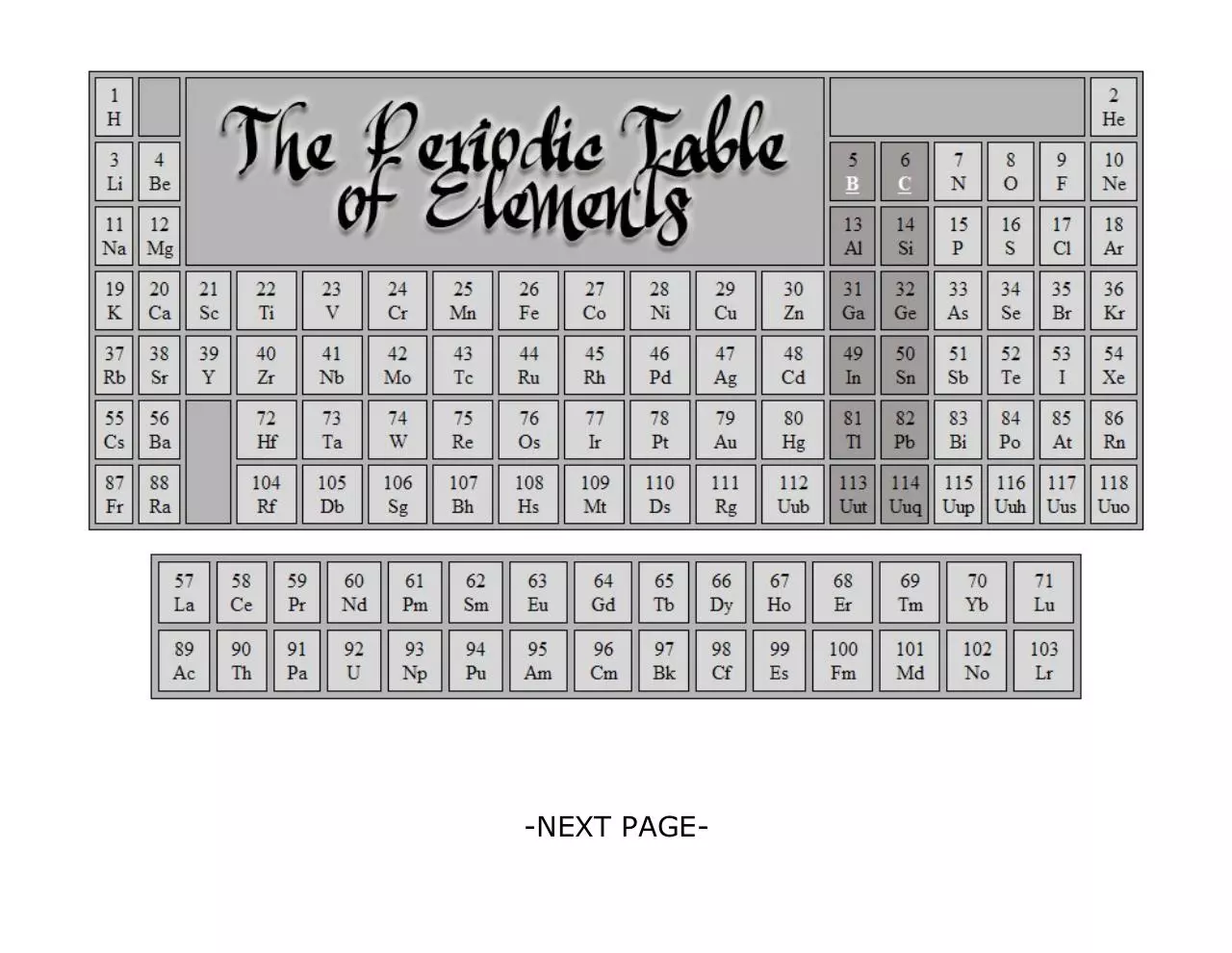
PERIODIC TABLE (periodic.html)
1. A webpage containing the periodic table of elements.
2. Background color of all cells should be the same.
�
1.
2.
Homepage contains an introduction about your website.
It should appear during the 1st load of the website.
ASSIGNED GROUP OF ELEMENTS (group.html)
1. A webpage containing one table to enumerate all the different
elements in your assigned group.
2. The elements assigned to you should be clickable.
3. Add a Link back to periodic.html
LAYOUT FOR PERIODIC TABLE OF ELEMENTS
3.
4.
5.
Highlight or change the background color of the group of elements
assign to you.
Elements assigned to you should be clickable links.
Just rename Act2_8.html to periodic.html
AUTHOR: FIRST QUARTER PERFORMANCE TASK (ptask1.html)
1. Ask your teacher for a copy of your 1st Q Performance Task
2. Just rename to ptask1.html
�
-NEXT PAGE-
�
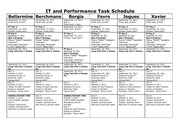
IT and Performance Task Schedule
Bellarmine Berchmans
September 15, 2011
Finish Act2_8.html
September 15, 2011
Finish Act2_8.html
PT Day 1:
September 20, 2011
Frames “index.html”
PT Day 2:
September 27, 2011
Quiz 4 (Frames)
Frames “TARGET” Navigation
“links.html”
Home Page “home.html”
1st Q PT “ptask1.html”
September 28, 2011
Long Test Part 1 Online
PT Day 1:
September 16, 2011
Frames “index.html”
PT Day 2:
September 28, 2011
Quiz 4 (Frames)
Frames “TARGET” Navigation
“links.html”
Home Page “home.html”
1st Q PT “ptask1.html”
September 29, 2011
Long Test Part 1 Online
September 29, 2011
Long Test Part 2 HandsOn
Day 3:
October 4, 2011
Assigned Group of
Elements Table
“group.html”
Day 4:
October 5, 2011
Tables for Each Element
Assign to Student
Example: “boron.html”
September 30, 2011
Long Test Part 2 HandsOn
Day 3:
October 5, 2011
Assigned Group of
Elements Table
“group.html”
Day 4:
October 6, 2011
Tables for Each Element
Assign to Student
Example: “boron.html”
CONSULTATION TIME
October 5, 2011
3:00-4:00PM Lab4004
Day 5:
Finalize “links.html”
Finalize “periodic.html”
Add links to periodic table
Day 5:
October 7, 2011
Finalize “links.html”
Finalize “periodic.html”
Add links to periodic table
Borgia
September 15, 2011
Quiz 3
Finish Act2_7.html
September 16, 2011
Finish Act2_8.html
PT Day 1:
September 19, 2011
Frames “index.html”
PT Day 2:
September 26, 2011
Quiz 4 (Frames)
Frames “TARGET” Navigation
“links.html”
Home Page “home.html”
1st Q PT “ptask1.html”
September 29, 2011
Long Test Part 1 Online
September 30, 2011
Long Test Part 2 HandsOn
Day 3:
October 3, 2011
Assigned Group of
Elements Table
“group.html”
CONSULTATION TIME
October 3, 2011
3:00-4:00PM Lab4004
Attendance will be
checked.
Day 4:
Tables for Each Element
Assign to Student
Example: “boron.html”
Favre
Jogues
Xavier
September 15, 2011
Finish Act2_8.html
September 16, 2011
Finish Act2_8.html
September 15, 2011
Finish Act2_8.html
PT Day 1:
September 19, 2011
Frames “index.html”
PT Day 2:
September 20, 2011
Quiz 4 (Frames)
Frames “TARGET” Navigation
“links.html”
Home Page “home.html”
1st Q PT “ptask1.html”
September 26, 2011
Long Test Part 1 Online
PT Day 1:
September 19, 2011
Frames “index.html”
PT Day 2:
September 20, 2011
Quiz 4 (Frames)
Frames “TARGET” Navigation
“links.html”
Home Page “home.html”
1st Q PT “ptask1.html”
September 26, 2011
Long Test Part 1 Online
PT Day 1:
September 16, 2011
Frames “index.html”
PT Day 2:
September 20, 2011
Quiz 4 (Frames)
Frames “TARGET” Navigation
“links.html”
Home Page “home.html”
1st Q PT “ptask1.html”
September 27, 2011
Long Test Part 1 Online
September 27, 2011
Long Test Part 2 HandsOn
Day 3:
September 29, 2011
Assigned Group of
Elements Table
“group.html”
Day 4:
October 3, 2011
Tables for Each Element
Assign to Student
Example: “boron.html”
September 27, 2011
Long Test Part 2 HandsOn
Day 3:
September 30, 2011
Assigned Group of
Elements Table
“group.html”
Day 4:
October 3, 2011
Tables for Each Element
Assign to Student
Example: “boron.html”
September 29, 2011
Long Test Part 2 HandsOn
Day 3:
September 30, 2011
Assigned Group of
Elements Table
“group.html”
Day 4:
October 4, 2011
Tables for Each Element
Assign to Student
Example: “boron.html”
Day 5:
October 4, 2011
Finalize “links.html”
Finalize “periodic.html”
Add links to periodic table
Day 5:
October 4, 2011
Finalize “links.html”
Finalize “periodic.html”
Add links to periodic table
Day 5:
October 6, 2011
Finalize “links.html”
Finalize “periodic.html”
Add links to periodic table
�
Day 6:
October 6, 2011
Finalize design
Finalize links
FINAL Submission
thru FTP
Day 5:
October 6, 2011
Finalize “links.html”
Finalize “periodic.html”
Add links to periodic table
CONSULTATION TIME
October 7, 2011
3:30-5:00PM Lab4004
Day 6:
Finalize design
Finalize links
FINAL Submission
thru FTP
Day 6:
October 6, 2011
Finalize design
Finalize links
FINAL Submission
thru FTP
Day 6:
October 7, 2011
Finalize design
Finalize links
FINAL Submission
thru FTP
Day 6:
October 7, 2011
Finalize design
Finalize links
FINAL Submission
thru FTP
Day 6:
October 7, 2011
Finalize design
Finalize links
FINAL Submission
thru FTP
”Finished or not finished PASS YOUR PERFORMANCE TASKS.”
Deadlines:
October 6 - Bellarmine, Favre
October 7 – Berchmans, Borgia, Jogues, Xavier
Periodical Exam = October 10, 2011 Monday
Coverage:
o
Table Tag
o
Table Attributes: width, height, border, bordercolor, cellspacing, cellpadding,
bgcolor, background, align
o
Table row <tr> attributes: height, background, bgcolor
o
Table Data Cell <td> attributes: width, height, bgcolor, background, align,
colspan, rowspan
o
Inserting Images in Cells: <td><img src=”filename”></td>
o
Empty Cells: With border <td> </td> Without border <td></td>
o
o
o
o
o
o
o
Colgroup Tag
Colgroup Attributes: width, span, bgcolor, background, align
Multiple Tables
Frame Tag
Frame attributes
Frameset Tag
TARGET Attribute
�
 Historical archive . public document