MODEL: pljx
Rev.: 20111017
DL
doorlock
INTERFACE
MODEL: PLJX
GM PASSLOCK 1 & 2 & VATS & ION
SELF LEARNING DIGITAL
INTERFACE: JUMPER SELECTION
INSTALLATION GUIDE
PRODUCT DESCRIPTION
PLJX is a "Self Learning" unit designed to bypass all GM vehicles equipped with Passlock I, Passlock II, VATS,
and the new style Passlock immobilizer found in the Saturn Ion & GM Colorado, Canyon, Cobalt, and Pursuit.
No measuring and matching of resistance values, PLJX automatically learns the resistor code value of any GM
and generates the value on demand when remote starting. One simple jumper allows you to easily select the
appropriate Passlock type. PLJX programs in one easy step.
PRODUCT FEATURES
-
Compatible with any remote car starter
Compatible with manufacturer's anti-theft & content theft security system
Maintains integrity of manufacturer's anti-theft immobilizer system
Maintains integrity of manufacturer's security and convenience functions
Compact design, easy to mount
No Key Required for operation (NKR)
Simple programming
All temperature operation
† Buick, Cadillac, GM, Oldsmobile, Saturn, Hummer, Chevrolet, Isuzu and Pontiac are registered trademarks and property of their respective companies.
© 2011 Directed Electronics. All rights reserved.
�
MODEL: pljx
Rev.: 20111017
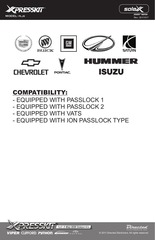
COMPATIBILITY:
- EQUIPPED WITH PASSLOCK 1
- EQUIPPED WITH PASSLOCK 2
- EQUIPPED WITH VATS
- EQUIPPED WITH ION PASSLOCK TYPE
© 2011 Directed Electronics. All rights reserved.
�
Cut the
White or
White/Blue
wire
N/C
Connect to 12V Constant
Ground
Ignition
}
Jumper Position:
Horizontal
Lower Two Pins
**Connect Brown wire
ONLY after programming
is complete**
**Be sure to verify the jumper type selection on the PLJX module prior to installation,
otherwise the kit will not function.
ION, Canyon & Colorado etc. do not have starter wires.
Programming
Button
INSTALLATION NOTES:
INPUT
(+)
INPUT
Pink
Orange
Red
(-) Black
(+)
INPUT
INPUT
INPUT
OUTPUT
White/Blue
White/Yellow
System
Ground When running
(-) Brown
Remote Start (status)
Green
N/C
(RV) Blue
Data ECM Side
Violet/White N/C
(+) Violet
Start Wire
(D) Pink/White
Data Key Side
OR
BCM
IGNITION
Remote Control
INPUT
PLJX is
preset to override
ION, Colorado &
Canyon Passlock
System Type. Programming
Jumper
White/Black
White
Brown
Blue
Orange
IGNITION
CYLINDER
STARTER OUTPUT WIRE (+)
FROM REMOTE CAR STARTER
MODEL: pljx
Rev.: 20111017
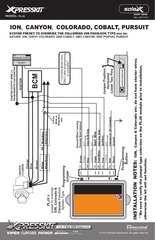
SYSTEM PRESET TO OVERRIDE THE FOLLOWING ION PASSLOCK TYPE use on:
SATURN ION, CHEVY COLORADO, 2005 COBALT, GMC CANYON, 2005 PONTIAC PURSUIT
ION, CANYON, COLORADO, COBALT, PURSUIT
© 2011 Directed Electronics. All rights reserved.
�
MODEL: pljx
Rev.: 20111017
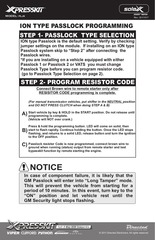
ION TYPE PASSLOCK PROGRAMMING
STEP 1- PASSLOCK TYPE SELECTION
ION type Passlock is the default setting. Verify by checking
jumper settings on the module. If installing on an ION type
Passlock system skip to “Step 2” after connecting the
Passlock wires.
*If you are installing on a vehicle equipped with either
Passlock 1 or Passlock 2 or VATS you must change
Passlock Type before you can program resistor code.
(go to Passlock Type Selection on page 2).
STEP 2- PROGRAM RESISTOR CODE
Connect Brown wire to remote starter only after
RESISITOR CODE programming is complete.
(For manual transmission vehicles, put shifter in the NEUTRAL position
and DO NOT PRESS CLUTCH when doing STEP A & B)
Start vehicle by key & HOLD in the START position. Do not release until
A) programming
is complete.
(Vehicle will NOT over crank.)
Press & hold the programming button. LED will come on solid, then
to flash rapidly. Continue holding the button. Once the LED stops
B) start
flashing, and returns to a solid LED, release button and turn the ignition
to the OFF position.
resistor Code is now programmed, connect brown wire to
C) Passlock
ground when running (status) output from remote starter and test
bypasskit function by remote starting the engine.
NOTICE
In case of component failure, it is likely that the
GM Passlock will enter into “Long Tamper” mode.
This will prevent the vehicle from starting for a
period of 10 minutes. In this event, turn key to the
“ON” position and let vehicle rest until the
GM Security light stops flashing.
© 2011 Directed Electronics. All rights reserved.
�
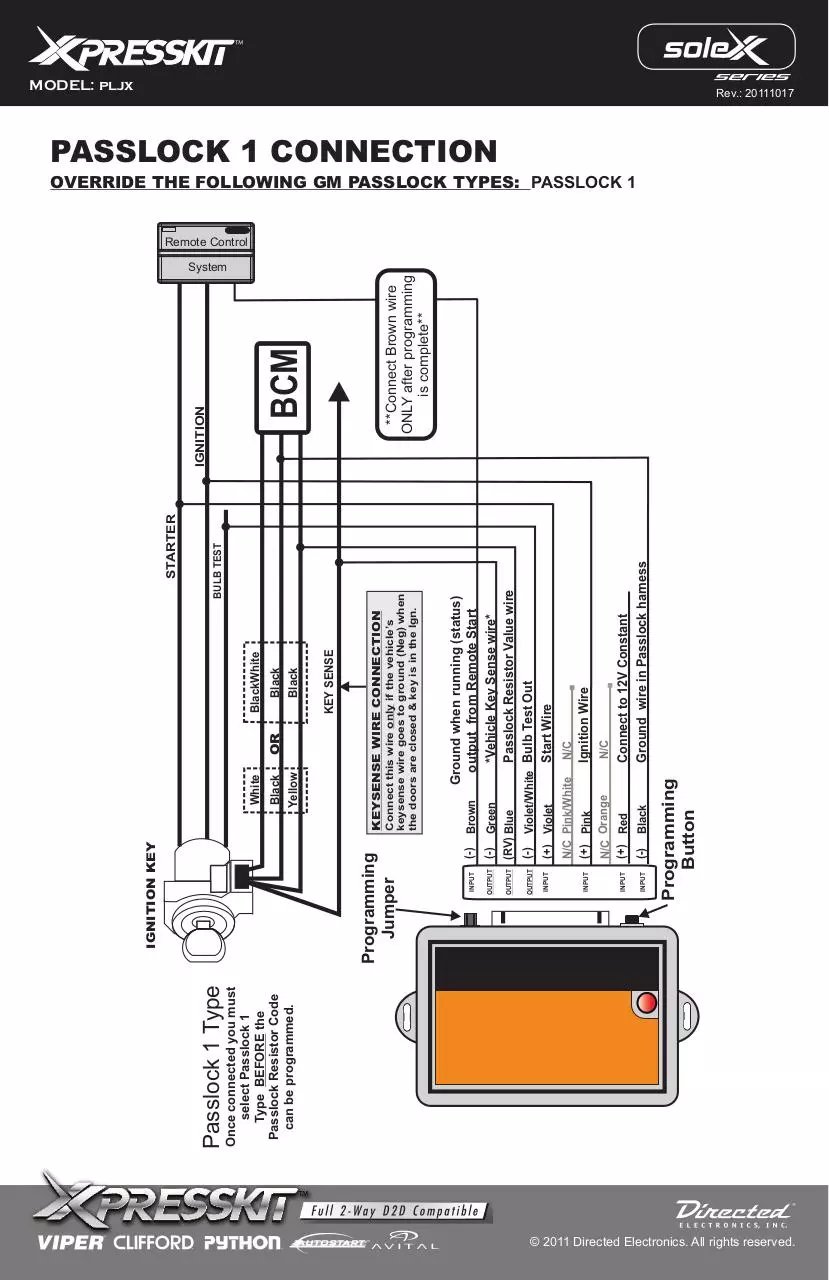
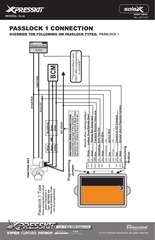
Once connected you must
select Passlock 1
Type BEFORE the
Passlock Resistor Code
can be programmed.
Passlock 1 Type
Black
Black
(-)
Black
N/C Pink/White
(+) Pink
N/C Orange
(+) Red
Brown
Connect to 12V Constant
Ground wire in Passlock harness
N/C
Ignition Wire
N/C
Ground when running (status)
output from Remote Start
(-) Green
*Vehicle Key Sense wire*
(RV) Blue
Passlock Resistor Value wire
(-) Violet/White Bulb Test Out
(+) Violet
Start Wire
(-)
STARTER
BULB TEST
Connect this wire only if the vehicle’s
keysense wire goes to ground (Neg) when
the doors are closed & key is in the Ign.
KEYSENSE WIRE CONNECTION
KEY SENSE
BlackWhite
Black
Yellow
OR
White
Programming
Button
INPUT
INPUT
INPUT
INPUT
OUTPUT
OUTPUT
OUTPUT
INPUT
Programming
Jumper
IGNITION KEY
**Connect Brown wire
ONLY after programming
is complete**
BCM
IGNITION
MODEL: pljx
Rev.: 20111017
PASSLOCK 1 CONNECTION
OVERRIDE THE FOLLOWING GM PASSLOCK TYPES: PASSLOCK 1
Remote Control
System
© 2011 Directed Electronics. All rights reserved.
�
Brown
Ground when running (status)
output from Remote Start
*Vehicle Key Sense wire*
Passlock Resistor Value wire
(-)
Black
N/C
N/C Pink/White
(+) Pink
N/C Orange
(+) Red
VATS
THESE WIRES WILL
BE FOUND IN A ORANGE
OR GRAY SLEEVE
**Connect Brown wire
ONLY after programming
is complete**
BCM
*The Equinox, Torrent and Vue up to 2007 are PASSLOCK 2 type even though it does not have a starter wire. Connect the start output wire of
remote to the violet start input wire.
Connect to 12V Constant
Ground wire in Passlock harness
N/C
Ignition Wire
Start Wire (Passlock 2 only)
(+) Violet
Programming
Button
INPUT
INPUT
INPUT
INPUT
KEYSENSE WIRE CONNECTION
KEY SENSE
Yellow
Connect this wire only if the vehicle’s
keysense wire goes to ground (Neg) when
the doors are closed & key is in the Ign.
(-) Green
(RV) Blue
N/C Violet/White N/C
(-)
Red / White
Orange/ Black
VATS
OUTPUT
OUTPUT
OUTPUT
INPUT
Programming
Jumper
OR
IGNITION
System
Black
Yellow
White
STARTER
Remote Control
INSTALLATION NOTES:
Once connected
you must select either
Passlock 2 & VATS Type
BEFORE the Passlock
Resistor Code
can be programmed.
Passlock 2
& VATS Type
IGNITION KEY
MODEL: pljx
Rev.: 20111017
PASSLOCK 2 & VATS CONNECTION
OVERRIDE THE FOLLOWING GM PASSLOCK TYPES: PASSLOCK 2 & VATS
© 2011 Directed Electronics. All rights reserved.
�
MODEL: pljx
Rev.: 20111017
GM PASSLOCK I & 2, VATS & ION
SELF LEARNING RESISTOR CODE INTERFACE
Application: All GM equipped Passlock 1 & 2 & VATS
STEP 1- PASSLOCK TYPE SELECTION
Once all Passlock wires have been connected, you must SELECT the proper PASSLOCK
TYPE before proceeding to STEP 2 -PROGRAM RESISTOR CODE. Select one of the 2
available PASSLOCK types.
Place jumper according to theft deterent type being bypassed.
Mode Passlock 1
Mode Passlock 2 & VATS
AB
A B
STEP 2- PROGRAM RESISTOR CODE
Connect Brown wire to remote starter only after RESISITOR CODE programming is complete.
A) Start vehicle by key.
B) Press & Hold Programming Button. LED will come on solid. Keep pressing until LED starts
blinking. When LED is blinking release button and turn the ignition to the OFF position.
C) Passlock resistor Code is now programmed, connect brown wire to ground output from remote
starter and test bypasskit function by remote starting the engine.
TECH NOTE:
If experiencing trouble programming, try:
A) Turn key to the ignition position, press on brake and place transmission into gear.
B) Now turn key to start position and release, continue with step “B” of previous programming.
(For manual transmission vehicles, put shifter in the NEUTRAL
position and DO NOT PRESS CLUTCH when doing STEP A & B)
NOTICE
In case of component failure, it is likely that the GM Passlock will enter into “Long Tamper” mode.
This will prevent the vehicle from starting for a period of 10 minutes. In this event, turn key to the
“ON” position and let vehicle rest until the GM Security light stops flashing.
ADDITONAL INFORMATION (Tech Notes)
CAVALIER, SUNFIRE 1999 or earlier. Passlock 1 (Bulb Test Wire) On certain vehicles, such as the 1999 Cavalier & Sunfire, there have been
cases where a voltage residual is detected on the starter wire after start up. This will prevent the PLJX from functioning properly.
To test: Start vehicle and use a voltmeter on the starter wire to check for 12V positive(+) residue after cranking. If a +12v residue is detected,
choose from solution #1 or #2 to rectify. (See solutions #1 & #2).
SOLUTION #2
SOLUTION #1
+12V BAT
FIREWALL
IGNITION
SWITCH
87
IGNITION
SWITCH
87A
86
X
STARTER KILL “CLUTCH SWITCH”
(MANUAL CAR)
(OPTIONNAL)
VIOLET
“STARTER” WIRE
FIREWALL
85
30
X
USE TWO 6 AMPERE DIODES
Make connection closest to
firewall
STARTER KILL “CLUTCH SWITCH”
(MANUAL CAR)
(OPTIONNAL)
VIOLET
STARTER
USE 1 RELAY SPDT TYPE
Make connection closest to
firewall
“STARTER” WIRE
STARTER
© 2011 Directed Electronics. All rights reserved.
�
MODEL: pljx
Rev.: 20111017
LIMITED ONE-YEAR CONSUMER WARRANTY
For a period of ONE YEAR from the date of purchase of a Directed Electronics remote start or security
product, Directed Electronics. (“DIRECTED”) promises to the original purchaser, to repair or replace with a
comparable reconditioned piece, the security or remote start accessory piece (hereinafter the “Part”),
which proves to be defective in workmanship or material under normal use, provided the following
conditions are met: the Part was purchased from an authorized DIRECTED dealer; and the Part is returned
to DIRECTED, postage prepaid, along with a clear, legible copy of the receipt or bill of sale bearing the
following information: consumer’s name, address, telephone number, the authorized licensed dealer’s
name and complete product and Part description.
This warranty is nontransferable and is automatically void if the Part has been modified or used in a manner
contrary to its intended purpose or the Part has been damaged by accident, unreasonable use, neglect,
improper service, installation or other causes not arising out of defect in materials or construction.
TO THE MAXIMUM EXTENT ALLOWED BY LAW, ALL WARRANTIES, INCLUDING BUT NOT LIMITED
TO EXPRESS WARRANTY, IMPLIED WARRANTY, WARRANTY OF MERCHANTABILITY, FITNESS
FOR PARTICULAR PURPOSE AND WARRANTY OF NON INFRINGEMENT OF INTELLECTUAL
PROPERTY, ARE EXPRESSLY EXCLUDED; AND DIRECTED NEITHER ASSUMES NOR
AUTHORIZES ANY PERSON OR ENTITY TO ASSUME FOR IT ANY DUTY, OBLIGATION OR LIABILITY
IN CONNECTION WITH ITS PRODUCTS. DIRECTED HEREBY DISCLAIMS AND HAS ABSOLUTELY
NO LIABILITY FOR ANY AND ALL ACTS OF THIRD PARTIES INCLUDING DEALERS OR INSTALLERS.
IN THE EVENT OF A CLAIM OR A DISPUTE INVOLVING DIRECTED OR ITS SUBSIDIARY, THE
PROPER VENUE SHALL BE SAN DIEGO COUNTY IN THE STATE OF CALIFORNIA. CALIFORNIA
STATE LAWS AND APPLICABLE FEDERAL LAWS SHALL APPLY AND GOVERN THE DISPUTE. THE
MAXIMUM RECOVERY UNDER ANY CLAIM AGAINST DIRECTED SHALL BE STRICTLY LIMITED TO
THE AUTHORIZED DIRECTED DEALER’S PURCHASE PRICE OF THE PART. DIRECTED SHALL NOT
BE RESPONSIBLE FOR ANY DAMAGES WHATSOEVER, INCLUDING BUT NOT LIMITED TO, ANY
CONSEQUENTIAL DAMAGES, INCIDENTAL DAMAGES, DAMAGES FOR THE LOSS OF TIME, LOSS
OF EARNINGS, COMMERCIAL LOSS, LOSS OF ECONOMIC OPPORTUNITY AND THE LIKE.
NOTWITHSTANDING THE ABOVE, THE MANUFACTURER DOES OFFER A LIMITED WARRANTY TO
REPLACE OR REPAIR AT DIRECTED’S OPTION THE PART AS DESCRIBED ABOVE.
Some states do not allow limitations on how long an implied warranty will last or the exclusion or
limitation of incidental or consequential damages. This warranty gives you specific legal rights and you
may also have other rights that vary from State to State. DIRECTED does not and has not authorized
any person or entity to create for it any other obligation, promise, duty or obligation in connection with
this Part.920-0007 07-06
This Interface kit / Data Bus Interface part has been tested on the listed vehicles. Other vehicles will be added
to the select vehicle list upon completion of compatibility testing. Visit website for latest vehicle application
guide. DISCLAIMER: Under no circumstances shall the manufacturer or the distributors of the bypass kit /
data bus interface part(s) be held liable for any consequential damages sustained in connection with the
part(s) installation. The manufacturer and it’s distributors will not, nor will they authorize any representative or
any other individual to assume obligation or liability in relation to the interface kit / data bus interface part(s)
other than its replacement. N.B.:Under no circumstances shall the manufacturer and distributors of this
product be liable for consequential damages sustained in connection with this product and neither assumes
nor authorizes any representative or other person to assume for it any obligation or liability other than the
replacement of this product only.
PROTECTED BY U.S. PATENTS: 5,719,551; 6,011,460 B1 *;6,243,004 B1; 6,249,216 B1; 6,275,147 B1; 6,297,731 B1; 6,346,876 B1; 6,392,534 B1; 6,529,124 B2; 6,696,927 B2; 6,756,885 B1; 6 , 7 5 6 , 8 8 6
B2; 6,771,167 B1; 6,812,829 B1; 6,924,750 B1; 7,010,402 B1; 7,015,830 B1; 7,031,826 B1; 7,046,126 B1; 7,061,137 B1; 7,068,153 B1; 7,205,679 B1; CDN. PATENT: 2,320,248; 2,414,991; 2 , 4 1 5 , 0 11 ;
2,415,023; 2,415,027; 2,415,038; 2,415,041; 2,420,947; 2,426,670; 2,454,089 EUROPEAN PATENT:1,053,128 PAT. PENDING: 2,291,306; MADE IN CANADA
© 2011 Directed Electronics. All rights reserved.
�
 Historical archive . public document