Converting factory-style power windows to one-touch automatic operation
By LCAM-01XA, with special thanks to John for showing me his setup, and to my fiancée Integra for helping me install this whole mess
We’ll start with the assumption that you know what the one-touch automatic power windows do in newer
vehicles, and that your own vehicle already has factory-style power windows installed. The next step is
finding a donor vehicle to rob of the parts needed to make said windows move on their own. In the earlyto mid- ‘90s Ford offered this system on several passenger cars, the ones I have personally seen soequipped are Taurus and Crown Victoria – however, the system was optional and so not all of those will
have it, but it does seem to be easier to find in the Taurii. So far I have been unable to find a pattern as to
what trim levels got it, so your best bet is to raid your local U-Pull-It auto salvage yard and inspect each
and every ’92-’94 Taurus you see – what you’re looking for is the word “Auto” spelled on the button for
the driver’s window. Once you find that, get medieval with the door panel – don’t worry, what you’re
after is not attached to it. And what you’re after is actually this little bugger:
It lives on the sheetmetal of the door right behind the panel you just ripped out, it’s about 2” wide and
3.5” long and a little over 1” thick, so kinda hard to miss it, but in case you don’t see it just move the
foam and plastic vapor barrier around some and you will surely find it. This particular unit has
engineering part # F2DB-14B118-AB, and also an ink-stamp that says 950213 – yours may have different
numbers on them, especially if you took it from a Crown Victoria (those as also blue in color, as opposed
to the black gem you’re looking at in those pics above). The important thing is to take the unit along with
as much length of its harness as possible, it makes routing wires later on much easier.
�
Great, so by now you should have the aforepictured brain-box in your clutches, and you’re about to haul
butt home and get to installing it – but wait, one brain-box controls only one window and in only one
direction – meaning you’ll need at least one more if you want to make both side windows of a 2-door
truck go down on their own. Oh, but it gets better – you can wire those things in pairs too, so you can
have your windows go both down AND up on their own, for this you’ll need two brain-boxes per door so
that’s four boxes per truck. However, if you’re an overachiever like me, and you also own a crew-cab that
you just so happen to have recently converted to rear power windows too, well, you better get to walking
that salvage yard high and wide, cause you’ll be needing lots of brain-boxes – I put four in my F350 (up
and down in both doors) and my F600 took six more (up and down in the front doors, but down only in
the rears cause I have idiots for friends and for some reason they love to hang out the rear windows and
put howler monkeys to shame) – now, if told you I actually hate wiring work of any kind, would you
believe me? And while you’re putting more mileage on your feet than on the horse you rode in on, locate
one or more vehicles like the one you’ll be working on at home, tear their doors apart, and hack off the
connectors between the door harness and the power window motor – one male-female pair per door is
sufficient, so if you’re working on a single truck then one truck is all you need to raid at the salvage yard,
but if you’re feeling industrious by all means grab some spares, for them silly things simply love to break
at the most unfortunate times (and sometimes even draw some blood from you in the process).
Alright, fast-forward some time, you’ve collected all the brain-boxes you’ll need, likely over several trips
to the salvage yard, and you also have a few spares just as a good measure, so let’s get to the real fun part
– wiring them up! For this you obviously need to pull your door panels. Next, probe your wires for the
window motor, easiest done at the connector for the pigtail attached to the motor – one of the two wires
will have 12V when you push the switch to “up” for the window, and the other will have 12V when you
push the switch “down”. For our purposes here let’s assume your “up” power wire is yellow, and your
“down” power wire is red (which, as a matter of fact, is the actual situation in a “bricknose” F-series, well
at least in the passenger-side door) – your vehicle may differ, so label your wires with tape and write “up”
and “down” on it if you must.
As you can imagine, it’s easier to install a single brain-box, like I did in the rear doors of my crew-cab.
Additionally, whether you install one or two brain-boxes, the best way to do so is by making them plug in
between the door harness and the window motor pigtail – remember those extra harness-to-motor
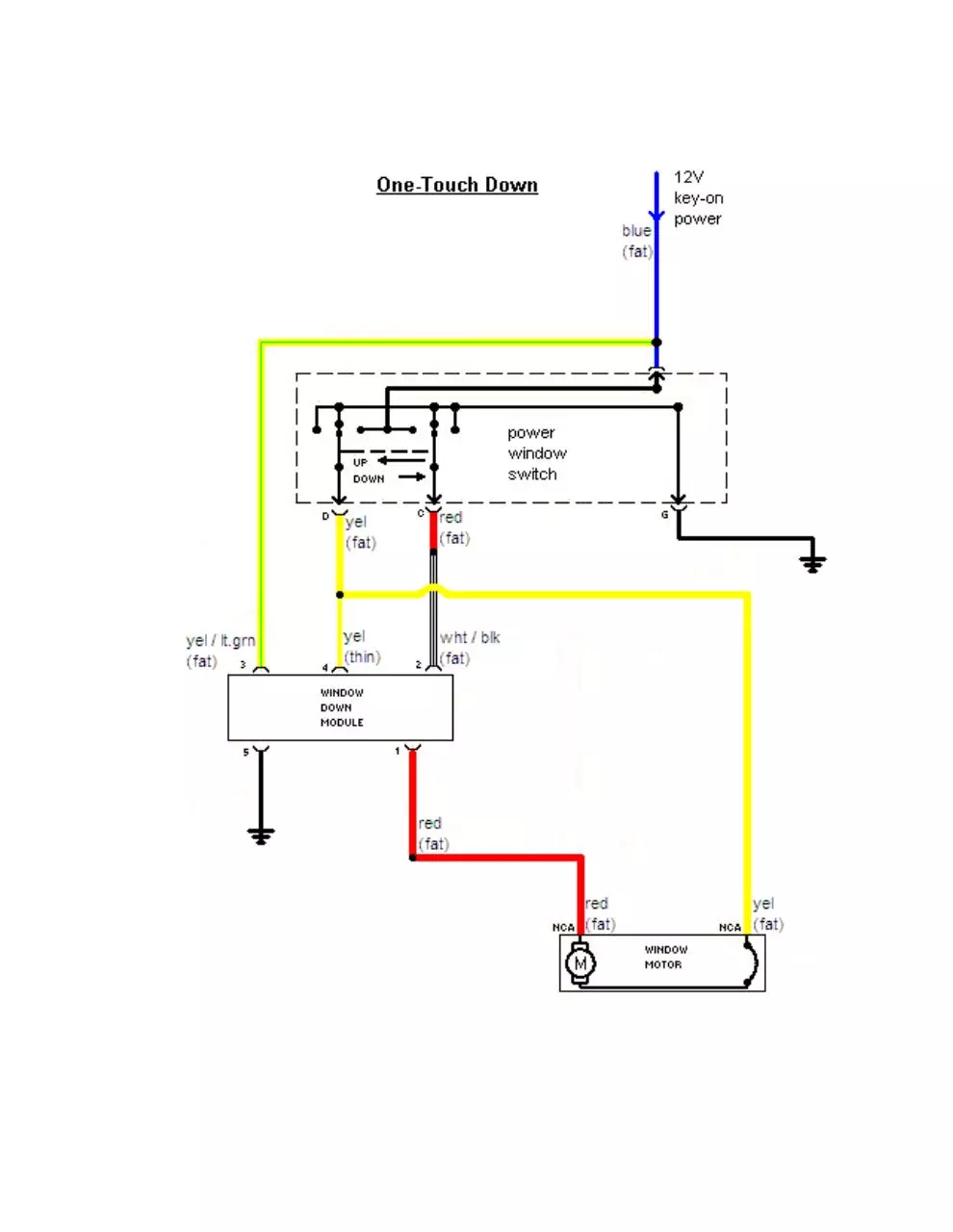
connectors I told you to salvage earlier, well that’s what you need them for. And this is the diagram you’ll
be following for this job:
�
�
The brain-box itself has five wires coming out of its own connector – two thin “control” ones and three
fat “power” wires – I have them labeled on the diagram for you. Their functions are as follows:
1) Fat yellow wire with green tracer – main power feed for the brain-box, you can run a stand-alone
power feed for it (enjoy your experience with the rubber bellows between the door and the cab),
but I thought it was a better idea to just locate the wire that supplies power to the window switch
and splice into that. This wire in all switches on both my trucks is blue, so this is marked in the
diagram.
2) Fat white wire with black tracer (could be dark brown too) – this is the control signal for brainbox that you want it to start turning the motor in the down direction, so connect it to the red wire
coming from the window switch. However, it also doubles as a ground wire for the motor in its
“up” direction of turning, which is why it is as fat as the other “power” wires.
3) Fat red wire – this is the output of power for turning the motor in the down direction, so connect
it to the red wire coming from the window motor itself.
4) Thin yellow wire – this is a control signal for the brain-box, it’s used to force it to bypass its loadsensing circuits and connect its fat red and white/black wires directly and thus provide a straight
grounding path for the window motor while it’s turning in the up direction – connect this wire to
the fat yellow wire coming from the window switch and going to the motor directly.
5) Thin black wire –this is the ground for the brain-box, attach it to the door’s sheetmetal
somewhere.
Again, it greatly helps if you did in fact salvage those switch-to-motor connectors I mentioned earlier, this
way should something happen to your brain-box you simply unplug it from both the switch and the motor
and plug the switch and motor together like they were from the factory, and you’re back to manual
operation of your power windows. If you didn’t install those extra connectors, should your brain-box
malfunction you can still unplug it, but your motor will only go up and that’s it, you won’t be able to open
your window anymore until you replace your malfunctioning brain-box. As to how a properly-functioning
brain-box operates, well this is how:
1) With the window up you simply push the “down” button once and release it, the window will
start rolling till it hits its bottom position, where the brain-box will shut the motor off.
2) If you want the window to stop moving, simply push and release the “down” button again, and
motor will shut off – this is what I usually do if I don’t want it open all the way.
3) You can also push and hold the “down” button, this effectively bypasses the brain-box and your
window rolls down for as long as you hold the button.
�
Pretty sweet, huh? Then again, it can always be sweeter – as I mentioned already, these brain-boxes can
be wired in pairs, thus controlling both the down and the up motion of the power window. Which is really
not that much more work than the single brain-box setup, and here’s the diagram for it:
�
Following the same principles of operation as the single-brain setup, this is what you’re looking at:
1) Both brain-boxes have their main power weeds (yellow/green wires) spliced into the blue power
wire for the window switch.
2) Both brain-boxes get grounded through their thin black wires (shared ground is OK).
3) Red wire from the switch gets connected to both white/black from DOWN brain-box and the thin
yellow wire from the UP brain-box.
4) Yellow wire from switch gets connected to both the thin yellow wire from the DOWN brain-box
and the white/black wire from the UP brain-box.
5) Red wire from motor gets connected to red wire of DOWN brain-box.
6) Yellow wire from motor gets connected to red wire from UP box.
Obviously it helps to label your brain-boxes as DOWN and UP, additionally I positioned the DOWN
brain-box on the bottom and the UP one right above it. Speaking of which, this is what they look like
installed - tucked away from the elements and anything that moves, yet still easy to access if needed:
And that’s all there is to it. Not too bad, right? Hey, if a monkey like me can do it, anyone can! Enjoy!
�
 Historical archive . public document