9H5QB ESSB Setup
MXL Genesis
The MXL Genesis is a masterfully engineered tube microphone with features and performance levels found in mics priced thousands
of dollars more. From intimate vocal recordings to fast-attacking rap, the Genesis cuts beautifully through the mix with spectacular
detail. Recording professionals and musicians are praising the Genesis for its clean highs, warm mids, and tight bottom-end, features
attributed in part to the genuine Mullard 12AT7 tube.
Presonus Eureka
The Eureka’s versatility stems in part from its malleable signal flow. With both XLR and ¼” line outputs, you can connect the Eureka
to almost any recording interface, amp, or P.A. system. The EQ can be pre- or post-compressor, and you can bypass each
independently. Balanced send and return jacks enable you to insert your favorite outboard processor before the compressor and EQ.
Mic XLR in single channel, then OUT into the DEQ2496.
DEQ2496
The DEQ2496 is an amazing EQ processor! I use only the Downward Expander LEFT (DYN) and Parametric EQ RIGHT
(PEQ). NO DEQ. GEQ is also utilized on LEFT channel only. I followed WZ5Q Voodoo Guru’s expert advice for this, whilst my
good friend Tony IK1JUO was instrumental in setting up this fine piece of gear.
BBE MaxCom
The BBE MaxCom is an easy-to-use dual channel compressor/limiter/gate and Sonic Maximizer that provides live or pre-recorded
material with clean, distortion free compression. Whether the goal is to control vocals, a stereo mix or just dial in hard limiting to
protect your speakers, the MaxCom will accomplish your needs with the reliability and sonic excellence.
dbx 131 Eq
The dbx® 2-Series Graphic Equalizer series have been designed to meet the needs of the most demanding sound reinforcement
environments, while offering the simplicity of straightforward controls. The 131 not only offers standard features like single-channel,
31, 1/3 octave bands, ISO frequency centers, +/- 12 dB input gain range, and switchable 50Hz/12 dB per octave low-cut filter, but also
includes other insightful features. These features include 20 mm faders; selectable +/-6dB or +/-12dB boost/cut range for precise gain
adjustments; XLR, and 1/4'' TRS connectors for installation ease; balanced inputs and outputs for quiet operation
The TC Electronic Triple-C Multi-band Compressor & M One XL Reverb do a tremendous job in Dynamic Control and bringing out
the frequency separation through spectral balancing. The frequency separation is just truly unreal !
© 9H5QB - 2013
msciclun@maltanet.net
�
© 9H5QB - 2013
msciclun@maltanet.net
�
SETTINGS for Presonus Eureka
PREAMPLIFIER – CONTROLS
GAIN: 25dB
IMPEDANCE SELECTOR: 150
SATURATION CONTROL: 40
LINE / +48V / -20dB / : OFF
Ω
COMPRESSOR
THRESHOLD: -18
RATIO: 2:1
GAIN: -2 dB
ATTACK: 9 o’clock
RELEASE: 9 o’clock
SOFT KNEE: OFF
SC-HP: 10
EQUALIZER
LOW
GAIN: -6 dB
FREQUENCY: 80Hz
Q (Bandwidth): 10 o’clock
BYPASS: OFF
MID
GAIN: -6dB
FREQ: 1.5 KHz
Q(Bandwidth): 9 o’clock
© 9H5QB - 2013
HIGH
GAIN: -6 dB
FREQ: 2.5 KHz
Q(Bandwidth): 9 o’clock
msciclun@maltanet.net
�
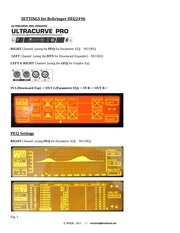
SETTINGS for Behringer DEQ2496
RIGHT Channel (using the PEQ for Parametric EQ) – NO DEQ
LEFT Channel (using the DYN for Downward Expander) – NO DEQ
LEFT & RIGHT Channel (using the GEQ for Graphic Eq)
IN L(Downward Exp) -> OUT L(Parametric EQ) -> IN R -> OUT R->
PEQ Settings
RIGHT Channel (using PEQ for Parametric EQ) – NO DEQ
Fig. 1
© 9H5QB - 2013
msciclun@maltanet.net
�
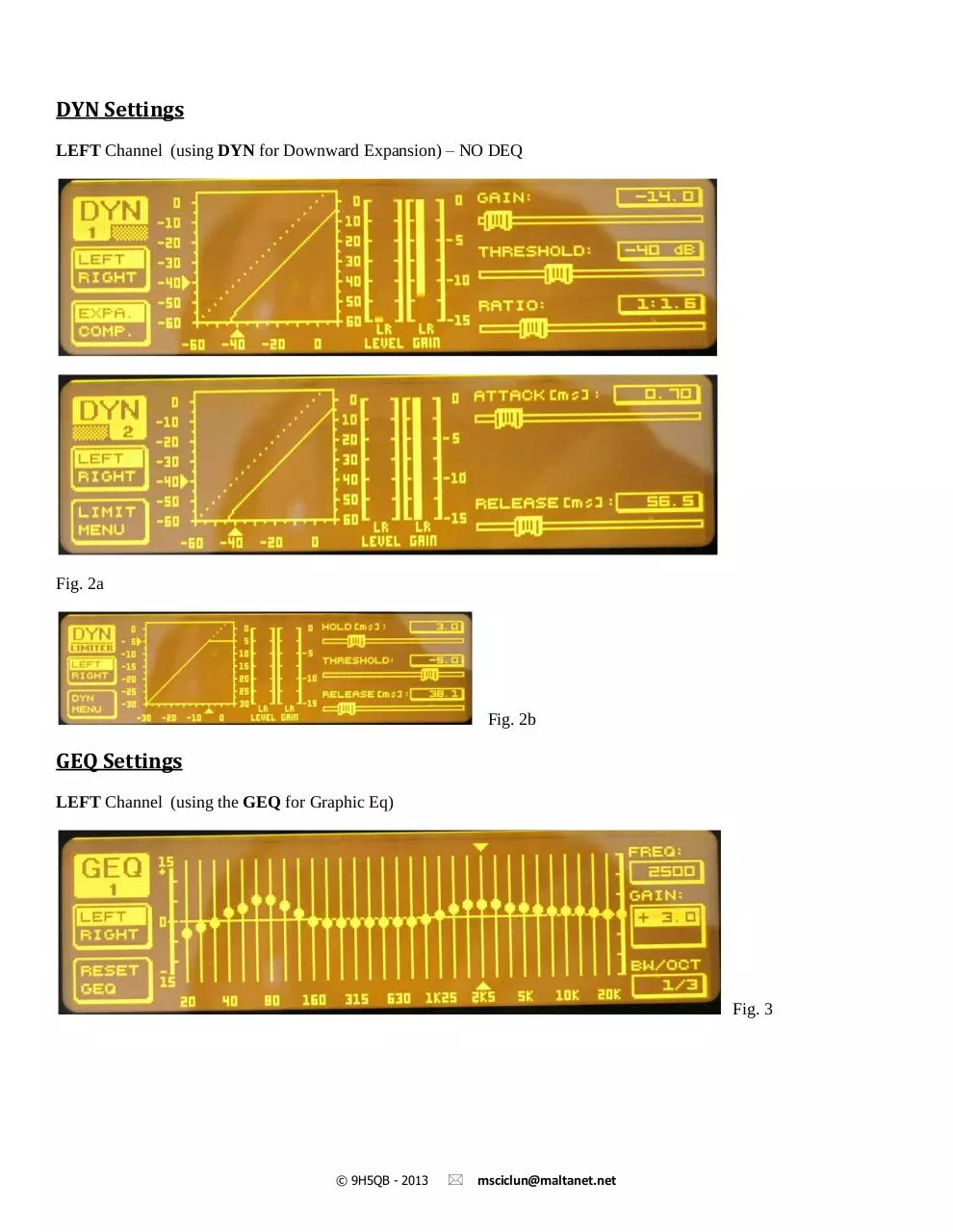
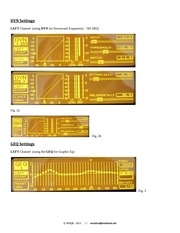
DYN Settings
LEFT Channel (using DYN for Downward Expansion) – NO DEQ
Fig. 2a
Fig. 2b
GEQ Settings
LEFT Channel (using the GEQ for Graphic Eq)
Fig. 3
© 9H5QB - 2013
msciclun@maltanet.net
�
PEQ – Basic Settings
As a starting point, be sure that none of the INPUT meter peaks are over -3db in INPUT gain, especially into the
DEQ2496. Set the EQ into PEQ (RIGHT Channel) mode (Fig. 1), these are settings for a basic starting point, it will
require tweaking for optimum sound. This is almost impossible to do without actually monitoring it ‘on air’ and possibly
using headphones.
Give these a try and see how it sounds. If you have a real bassy voice then you might have to reduce Param 1(Fig.1)
freq and perhaps reduce a bit of the gain.
If you have a lot of MIDS in your voice, then you might have to reduce Param 3 & 4(Fig. 1) filters.
The HIGHS will be the hardest to set. You want to push enough to get some brilliance and clarity, but without having a
Compressor, you won't be able to push a lot of them without causing ‘tearing’ and ‘sibilance’ in your signal. The secret
here is to keep the bandwidth narrow, and just adjust the gains. The frequencies listed in (Fig. 1) should be perfect on the
Highs.
Param 7(Fig. 1) filter is for ‘brittleness’ reduction. It should be good if set as shown.
Param 2 filter is for boominess and boxiness. It should also be good as shown, however if your voice fundamentals are
from 100Hz to 200Hz, try reducing the gain another -5db to a total of -20db.
Lastly, keep an eye on Param 6 filter. If it sounds too ‘nasal’, then reduce this filter gain to 0 and see if it goes away.....if
it helps then reduce it further.
© 9H5QB - 2013
msciclun@maltanet.net
�
SETTINGS for BBE Maxcom
© 9H5QB - 2013
msciclun@maltanet.net
�
SETTINGS for TC Electronic Triple C
I/O Menu:
Press the “Menu” pushbutton – “Select” is displayed
Turn the “Value Set/Enter” knob to select the “I/O’ Menu” option
Push the “Value Set/Enter” knob to enter the Menu – You are in the I/O Menu
SET THESE PARAMETERS AS FOLLOWS
Turn the outer “Parameter” knob to change Parameters in menu
Turn the inner “Value Set/Enter” knob to change the settings of the parameters
Push the inner “Value Set/Enter” knob to select the changed setting
INPUT
-
ANALOG
CLOCK
-
48kHz
OUT RANGE
-
14dBU
OUT LEVEL
-
0dB
DIG INGAIN
-
0dB
DITHER
-
OFF
STATUSBITS
-
S/PDIF
MIDI CHAN
-
1
MIDI CC
-
ON
PRG BANK
-
User
BULK DUMP
-
<ENTER>
SYSEX ID
-
0
LINK
-
OFF
EXPANDER
-
ON
VIEW ANGLE -
32
© 9H5QB - 2013
msciclun@maltanet.net
�
A few words about the Front Panel Controls for the Multi-Band Compressor.
The Threshold, Ratio, Attack, and Release Controls on the front of the unit only control the MID Band
values. The Triple-C slaves the LO and HI Bands to the MID Band front controls. This is the reason a lot of
people don’t like this unit. What they failed to realize was that there are more settings in the “Edit Menu” to
individually control the Threshold values of the LO, MID, and HI Band Compressors. This in conjunction with
the Front Panel Controls (especially the LO-BAND and HI-BAND RELEASE Controls) gives enough of a
combination to make unbelievable results. It just takes a lot of “Tweakin”…Ha Ha!
PROGRAM SETUP:
Press the “Menu” pushbutton – “Select” is displayed
Turn the inner “Value Set/Enter” knob to select the “Recall” option
Push the inner “Value Set/Enter” knob to enter the Menu – You are in the Preset Menu
Turn the inner “Value Set/Enter” knob to select “F1 Triple-C Comp” option
Push the inner “Value Set/Enter” knob to select this option
You are now in the Triple-C Comp Program.
We will change the Parameters and save this as your own program in the User Presets Memory.
Change the Parameters as follows:
FRONT PANEL CONTROLS:
From the left of the unit to the right. These will of course be adjusted later for correct levels.
KNOBS:
(Upon adjusting the knobs, there is an “OVERIDE” indicator on the display that will blink. You must
move the control and wait for the blinking to stop before it will allow you to change the parameter.)
INPUT LEVEL -
-3 dB
THRESHOLD
-
-14 dB
RATIO
-
1.12:1 rate
ATTACK
-
10.0 ms
RELEASE
-
20ms
LO-BAND OUTPUT -
14dB
HI-BAND OUTPUT -
6 dB
MAKEUP LEVEL-
-3 dB
© 9H5QB - 2013
msciclun@maltanet.net
�
 Historical archive . public document