Table of Contents
Type chapter title (level 1) ..................................................................................................................... 1
Type chapter title (level 2) .................................................................................................................. 2
Type chapter title (level 3) .............................................................................................................. 3
Type chapter title (level 1) ..................................................................................................................... 4
Type chapter title (level 2) .................................................................................................................. 5
Type chapter title (level 3) .............................................................................................................. 6
�
Developing games with DSFML
Part 1: Introduction
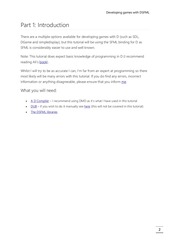
There are a multiple options available for developing games with D (such as SDL,
DGame and simpledisplay), but this tutorial will be using the SFML binding for D as
SFML is considerably easier to use and well known.
Note: This tutorial does expect basic knowledge of programming in D (I recommend
reading Ali’s book).
Whilst I will try to be as accurate I can, I’m far from an expert at programming so there
most likely will be many errors with this tutorial. If you do find any errors, incorrect
information or anything disagreeable, please ensure that you inform me.
What you will need:
A D Compiler – I recommend using DMD as it’s what I have used in this tutorial
DUB – if you wish to do it manually see here (this will not be covered in this tutorial)
The DSFML libraries
2
�
Developing games with DSFML
Part 2: Setting up
Initializing DUB
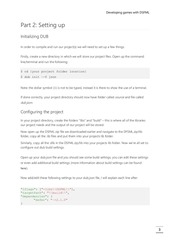
In order to compile and run our project(s) we will need to set up a few things.
Firstly, create a new directory in which we will store our project files. Open up the command
line/terminal and run the following:
$ cd {your project folder location}
$ dub init –-f json
Note: the dollar symbol ($) is not to be typed, instead it is there to show the use of a terminal.
If done correctly, your project directory should now have folder called source and file called
dub.json.
Configuring the project
In your project directory, create the folders “libs” and “build” – this is where all of the libraries
our project needs and the output of our project will be stored.
Now open up the DSFML zip file we downloaded earlier and navigate to the DFSML.zip/lib
folder, copy all the .lib files and put them into your projects lib folder.
Similarly, copy all the .dlls in the DSFML.zip/lib into your projects lib folder. Now we’re all set to
configure out dub build settings.
Open up your dub.json file and you should see some build settings, you can edit these settings
or even add additional build settings (more information about build settings can be found
here).
Now add/edit these following settings to your dub.json file, I will explain each line after:
"lflags": ["+libs\\DSFML\\"],
"targetPath": "\\build\\",
"dependencies": {
"dsfml": "~>2.1.0"
}
3
�
Developing games with DSFML
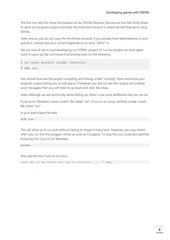
The first line tells the linker the location of our DSFML libraries, the second line tells DUB where
to store our program output and lastly the third line onwards is where we tell DUB we’re using
DSFML.
Note: ensure you do not copy the third lines onwards if you already have dependencies in your
dub.json, instead edit your current dependency to have “dsfml” in.
We are now all set to start developing our DSFML project, to run our project we once again
need to open up the command line/terminal and run the following:
$ cd {your project folder location}
$ dub run
You should now see the project compiling and linking, under “running” there should be your
program output telling you to edit app.d. If however you did not see this output and instead
error messages then you will need to go back and redo the steps.
Note: although we are technically done setting up, there’s one more additional step we can do:
If you’re on Windows create a batch file called “run”, If you’re on Linux, similarly create a bash
file called “run”.
In your batch/bash file add:
dub run
This will allow us to run dub without having to retype it every time. However, you may notice
when you run this the program closes as soon as it outputs. To stop this you could also add the
following line if you’re on Windows:
pause
And add this line if you’re on Linux:
read -n1 -r -p "Press any key to continue . . . " key
4
�
Developing games with DSFML
Testing DSFML
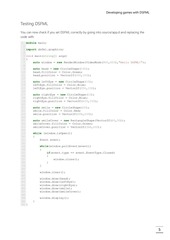
You can now check if you set DSFML correctly by going into source/app.d and replacing the
code with:
1 module main;
2
3 import dsfml.graphics;
4
5 void main(string[] args)
6{
auto window = new RenderWindow(VideoMode(800,600),"Hello DSFML!");
7
8
auto head = new CircleShape(100);
9
10
head.fillColor = Color.Green;
11
head.position = Vector2f(300,100);
12
auto leftEye = new CircleShape(10);
13
14
leftEye.fillColor = Color.Blue;
15
leftEye.position = Vector2f(350,150);
16
auto rightEye = new CircleShape(10);
17
18
rightEye.fillColor = Color.Blue;
19
rightEye.position = Vector2f(430,150);
20
auto smile = new CircleShape(30);
21
22
smile.fillColor = Color.Red;
23
smile.position = Vector2f(368,200);
24
auto smileCover = new RectangleShape(Vector2f(60,30));
25
26
smileCover.fillColor = Color.Green;
27
smileCover.position = Vector2f(368,200);
28
while (window.isOpen())
29
30
{
31
Event event;
32
while(window.pollEvent(event))
33
34
{
if(event.type == event.EventType.Closed)
35
36
{
37
window.close();
38
}
39
}
40
41
window.clear();
42
43
window.draw(head);
44
window.draw(leftEye);
45
window.draw(rightEye);
46
window.draw(smile);
47
window.draw(smileCover);
48
49
window.display();
50
}
51 }
5
�
Developing games with DSFML
If it worked you should be greeted with a smiley face, if not then try and read the error to see
where you went wrong.
6
�
 Historical archive . public document