Dealer CMS User Guide
A training resource for i-Motor Website Users
i-Motor Driving Online Business
1
�
Dealer CMS User Guide
Username & Password
Please refer to email from i-Motor for username, password & login URL.
If you have not received the email please contact us via email support@imotor.com.au or telephone 03 9556 5442.
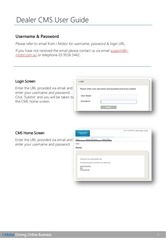
Login Screen
Enter the URL provided via email and
enter your username and password.
Click ‘Submit’ and you will be taken to
the CMS home screen.
CMS Home Screen
Enter the URL provided via email and
enter your username and password.
i-Motor Driving Online Business
2
�
Dealer CMS User Guide
Special Offers – Create, Edit & View
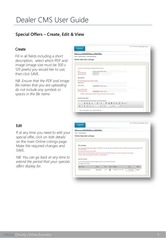
Create
Fill in all fields including a short
description; select which PDF and
image (image size must be 300 x
120 pixels) you would like to use;
then click SAVE.
NB. Ensure that the PDF and image
file names that you are uploading
do not include any symbols or
spaces in the file name
Edit
If at any time you need to edit your
special offer, click on ‘edit details’
on the main Online Listings page.
Make the required changes and
SAVE.
NB. You can go back at any time to
extend the period that your specials
offers display for.
i-Motor Driving Online Business
3
�
Dealer CMS User Guide
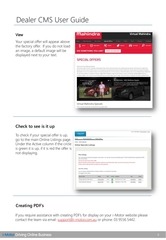
View
Your special offer will appear above
the factory offer. If you do not load
an image, a default image will be
displayed next to your text.
Check to see is it up
To check if your special offer is up,
go to the main Online Listings page.
Under the Active column if the circle
is green it is up, if it is red the offer is
not displaying.
Creating PDF’s
If you require assistance with creating PDF’s for display on your i-Motor website please
contact the team via email: support@i-motor.com.au or phone: 03 9556 5442.
i-Motor Driving Online Business
4
�
www.i-motor.com.au
i-Motor Driving Online Business
Suite 305
Post:
75 Tulip Street
PO Box 2270
Cheltenham
Moorabbin
Victoria 3192
Victoria 3189
P: 03 9556 5442
F: 03 9556 5448
5
�
 Historical archive . public document