DEADMAU5 TEACHES ELECTRONIC MUSIC PRODUCTION
1
v1.0
�
WELCOME TO MASTERCLASS
DEADMAU5 TEACHES ELECTRONIC MUSIC PRODUCTION
2
You have to think that if you can impact one person with your music, then it's pretty much worth it.
— deadmau5
A FEW FACTS ABOUT DEADMAU5
▶▶
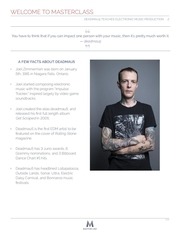
Joel Zimmerman was born on January
5th, 1981 in Niagara Falls, Ontario.
▶▶
Joel started composing electronic
music with the program “Impulse
Tracker,” inspired largely by video game
soundtracks.
▶▶
Joel created the alias deadmau5, and
released his first full length album
Get Scraped in 2005.
▶▶
Deadmau5 is the first EDM artist to be
featured on the cover of Rolling Stone
magazine.
▶▶
Deadmau5 has 3 Juno awards, 6
Grammy nominations, and 3 Billboard
Dance Chart #1 hits.
▶▶
Deadmau5 has headlined Lollapalooza,
Outside Lands, Sonar, Ultra, Electric
Daisy Carnival, and Bonnaroo music
festivals.
v1.0
�
01 INTRODUCTION
DEADMAU5 TEACHES ELECTRONIC MUSIC PRODUCTION
3
HOW TO USE THIS CLASS
Before you dive in, we have a few recommendations for getting the most out of your experience.
THINGS YOU MIGHT NEED
To enjoy this class, you only need your computer and a desire to learn. However, here are a few
other items we think will enhance your learning experience:
A
B
C
D
CLASS WORKBOOK
This printable PDF filled with lesson
recaps and assignments.
SUGGESTED VIEWING SCHEDULE
Deadmau5 explains his techniques to you in 23
lessons. It’s tempting to finish all of the lessons
in one sitting. We’d like to recommend our
suggested viewing schedule, which you’ll
find on page 5 of this Class Workbook.
DEADMAU5'S MUSIC
A few of deadmau5's songs are mentioned
repeatedly in the class: "Snowcone", "Imaginary
Friends", "Phantoms Can't Hang", "Cat Thruster"
and "No Problem". Have Spotify or a streaming
application handy to be able to listen to songs
and albums mentioned in the class.
WRITING MATERIALS
You'll want to keep writing materials handy, both
for taking notes while going through the class
and for completing several of the assignments.
v1.0
�
01 INTRODUCTION
DEADMAU5 TEACHES ELECTRONIC MUSIC PRODUCTION
4
CLASS RESOURCES
To get the most out of these lessons, you should be familiar with the basics of recording and
processing audio on your computer. If you already have those skills and can produce tracks of your
own, you should be ready to go. If you feel like you need to get up to speed or brush up on some
core concepts, go through our Fundamentals Guide, which you can find in the Resource Section.
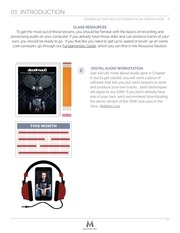
E
DIGITAL AUDIO WORKSTATION
Joel will talk more about studio gear in Chapter
4, but to get started, you will want a piece of
software that lets you put Joel's lessons to work
and produce your own tracks. Joel's techniques
will apply to any DAW. If you don't already have
one of your own, we'd recommend downloading
the demo version of the DAW Joel uses in the
class, Ableton Live.
v1.0
�
01 INTRODUCTION
DEADMAU5 TEACHES ELECTRONIC MUSIC PRODUCTION
5
THINGS YOU WILL SEE
Here are a few general tips for navigating your way around the class site:
LESSON VIDEOS
Watch and listen to deadmau5
explain the nuts and bolts of his
process
INTERACTIVE ASSIGNMENTS
Take advantage of the innovative tools
and interactive assignments we’ve
created to enhance your education.
LESSON DISCUSSIONS
Share your works in progress and ask
your peers for help and support
if you’ve hit a roadblock.
OFFICE HOURS
Submit and watch video and text
questions for deadmau5 from the
MasterClass community.
COMMUNITY
Continue connecting with your
MasterClass peers with
our community features.
QUESTIONS & FEEDBACK
We want to hear from you!
Email support@masterclass.com
v1.0
�
01 INTRODUCTION
DEADMAU5 TEACHES ELECTRONIC MUSIC PRODUCTION
6
CLASS OUTLINE - SUGGESTED VIEWING SCHEDULE
WEEK 1
01
INTRODUCTION
02 THE DEADMAU5
PROCESS: THEORY
▶▶ Find a Way to Stop Thinking
▶▶ You Don't Have to Feel It to Write It
▶▶ Experimentation not Inspiration
▶▶ Building Your Mister Potato Head
Bin
▶▶ 23 Seconds is a Track
▶▶ Every Producer Copies, Good
Producers Copy in New Ways
▶▶ You Don't Have to be a Team
Player
▶▶ Doubts and Mistakes Make you
Better
▶▶ Nothing's Ever Really Done
03
THE DEADMAU5
PROCESS: PRACTICE
▶▶ Starting A Track From Scratch
04
WEEK 2
WEEK 3
05
DEVELOPING
MELODIC STRUCTURES
09 DIGITAL VS.
ANALOG SYNTHS
▶▶ Resolving
▶▶ Hearing the Digital Analog
Difference
▶▶ Writing a Melody
▶▶ Drone Notes
▶▶ Digital vs. Analog Cross Modulation
▶▶ Don't Be Obvious
▶▶ Synths in Snowcone
06
TURNING MELODIES
INTO ARRANGEMENTS
10
▶▶ Bass Lines
▶▶ Lead Lines
▶▶ Think Outside the Preset Box
▶▶ Use Effects to Create Original
▶▶ Case Study: Cat Thruster
SHAPING SOUNDS WITH
EFFECTS AND PROCESSING
Sounds
07 INTRODUCTION TO
SYNTHESIZED SOUNDS
▶▶ The Secret to Fat Bass
▶▶ Reverbs
▶▶ Adding Spaces and Depth
▶▶ We're Here to Create Sounds No
▶▶ Processing Shit Into Gold
One's Ever Heard
▶▶ Synth Basics: Waveforms and
Filters
▶▶ Using Envelops and LFOs to
Modulate Sound
11
BEATS: PART 1
▶▶ Dance Beats Should Be for
Everybody
▶▶ There's No Such Thing as a Bad
Drum Sample
BUILDING YOUR
HOME STUDIO
EXPERIMENTING WITH
MODULAR SYNTHS
▶▶ Building Your Kick Sound
▶▶ Everything Ends Up Digital
▶▶ Cross Modulating Simple Waves
▶▶ Using Envelopes To Automate
▶▶ Balancing Drums and Melody
▶▶ Your Computer Setup
▶▶ DAWS
▶▶ Hardware Can Come Later
▶▶ No Headphones
▶▶ Studio Monitors
▶▶ It's About Your Ideas Not Your Gear
08
▶▶ Adding Effects
▶▶ Playing Sequenced Notes
▶▶ Putting Mod Synths in Your Tracks
▶▶ Start Experimenting
▶▶ Watch Out for Phase Cancellation
12
BEATS: PART 2
▶▶ The Secret to Snare Sounds
▶▶ Making Your Drums Breathe
▶▶ Case Study: Snowcone Drums
v1.0
�
01 INTRODUCTION
DEADMAU5 TEACHES ELECTRONIC MUSIC PRODUCTION
WEEK 4
13
STRUCTURING SONGS
▶▶ Copy, Copy, Add and Subtract
▶▶ Find the Right Track Length
▶▶ Think Ahead to Your Live Set
▶▶ There's More to Music Than Big
Drops
14
REMIXES
▶▶ Don't Remix, Rework
▶▶ Choosing Remix Material
▶▶ What Starts as a Remix...Can End
as Your Own Track
▶▶ Guide to Remixing deadmau5
▶▶ Starting Your Own deadmau5
Remix
15
MIXING
▶▶ Tracks and Groups
▶▶ Earballing
▶▶ EQing for Clarity
▶▶ Getting Your Leads to Sit in the
WEEK 5
MASTERING CASE
STUDY: SNOWCONE
21
▶▶ Comparing Different Master Chains
▶▶ A Show, B Show
▶▶ Parametric EQing
▶▶ Keep an Eye on Signal Path
▶▶ Rehearse Every Aspect of Your
18
STARTIG YOUR
PRODUCING CAREER
▶▶ Labels are Looking for the Total
Package
▶▶ The Truth About Getting Signed
▶▶ Invest in Yourself
▶▶ Making Music Your Full Time Job
▶▶ Define Your Brand
▶▶ The Secret to Selling Yourself:
Don't
UNDERSTANDING
THE MUSIC BUSINESS
▶▶ Learn the System and Make It
16
20
▶▶ Loudness vs. Perceived Loudness
▶▶ Learn Your Systems
▶▶ Keeping Your Equipment Running
▶▶ Keep it Cool
22
ON STAGE: THE SHOW
▶▶ Forget the Crowd
▶▶ Don't Be Like a Saw Movie
▶▶ Putting on a Show
▶▶ Another Day at the Office
▶▶ Feeling Comfortabe on Stage
23 CLOSING
Work For You
▶▶ Don't Stress Over Titles
▶▶ Mastering Basics
▶▶ Limiting
▶▶ No Magic Master Chain
Show
19
▶▶ Mixing in Home Studio
▶▶ Mastering Yourself
ON STAGE: THE
TECHNICAL SIDE
▶▶ What's in the Cube
▶▶ Shaping Your Bass
▶▶ LFO Tool vs. Compression
MASTERING
WEEK 6
17
▶▶ The Problems With Major Labels
▶▶ Building Your Team
▶▶ The Online Marketplace
▶▶ An Approach to Making Albums
Track
7
ON STAGE: THE MUSIC
▶▶ Programming Shows
▶▶ Playing the DAW
▶▶ Crafting Your Set List
▶▶ Openings and Endings Matter
Most
▶▶ Getting Feedback on Your Mix
v1.0
�
 Historical archive . public document