EMBED GUIDE FOR INFLUENCERS
GETTING STARTED GUIDE
OVERVIEW
�
This document will provide you with instructions on how to
embed the Hashtagart Mosaic into any webpage or blog;
there are two options to make this process seamless.
Step 1 - Embed the mosaic
Step 2 - Click ADD ME and enter your message into the
mosaic
HOW TO EMBED OPTION 1
Option 1 - Standard Embed
Add the following Hyperactivate embed code to your blog
post. You may need to switch your blog editor to HTML to
add the code.
<add code>
That’s it. You’re all done! Our platform can take it from
here.
2
�
HOW TO EMBED OPTION 2
Option 2 - Non-Javascript Embed
If the mosaic does not load on your page, you may have
trouble loading javascript. Option 2 is a less restrictive
embed that does not require javascript.
Locate the place in your HTML code where your mosaic
should appear, and add this code.
<add code>
3
�
WHAT HAPPENS
NEXT
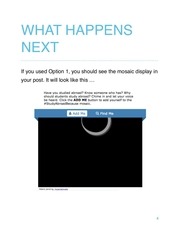
If you used Option 1, you should see the mosaic display in
your post. It will look like this …
4
�
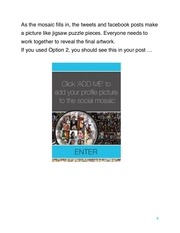
As the mosaic fills in, the tweets and facebook posts make
a picture like jigsaw puzzle pieces. Everyone needs to
work together to reveal the final artwork.
If you used Option 2, you should see this in your post …
5
�
ADD YOURSELF
• Click ADD ME to add yourself to the mosaic.
6
�
TROUBLESHOOTING
• Sometimes in wordpress, the preview button breaks
javascript code. If you are using wordpress you may try
to post your message without clicking preview first.
• If the first embed option doesn’t work, use the second
embed option.
• If you have any trouble integrating the mosaic and
embed code, let us know and we can assist you. Email
idan@hyperactivate.com
7
�
 Historical archive . public document