PROJECT 12 : SUDOKU
Due Saturday at 5:00 PM MST
The second part of the Sudoku Program project (the first part being the design document
due earlier) is to write the code necessary to make the Sudoku appear on the screen and to
allow some simple interactions.
Requirements
You are to create a program that performs six operations:
1.
2.
3.
4.
5.
6.
Read: Read a board from a file into our board[][] array.
Write: Write the board[] array back to a file.
'D' Option: Display the contents of the board[][] array on the screen.
'E' Option: Edit a square with no verification that it is correct or valid.
'Q' Option: Exit the interaction loop and launches the Write code.
'?' Option: Displays the instructions on the screen.
Example
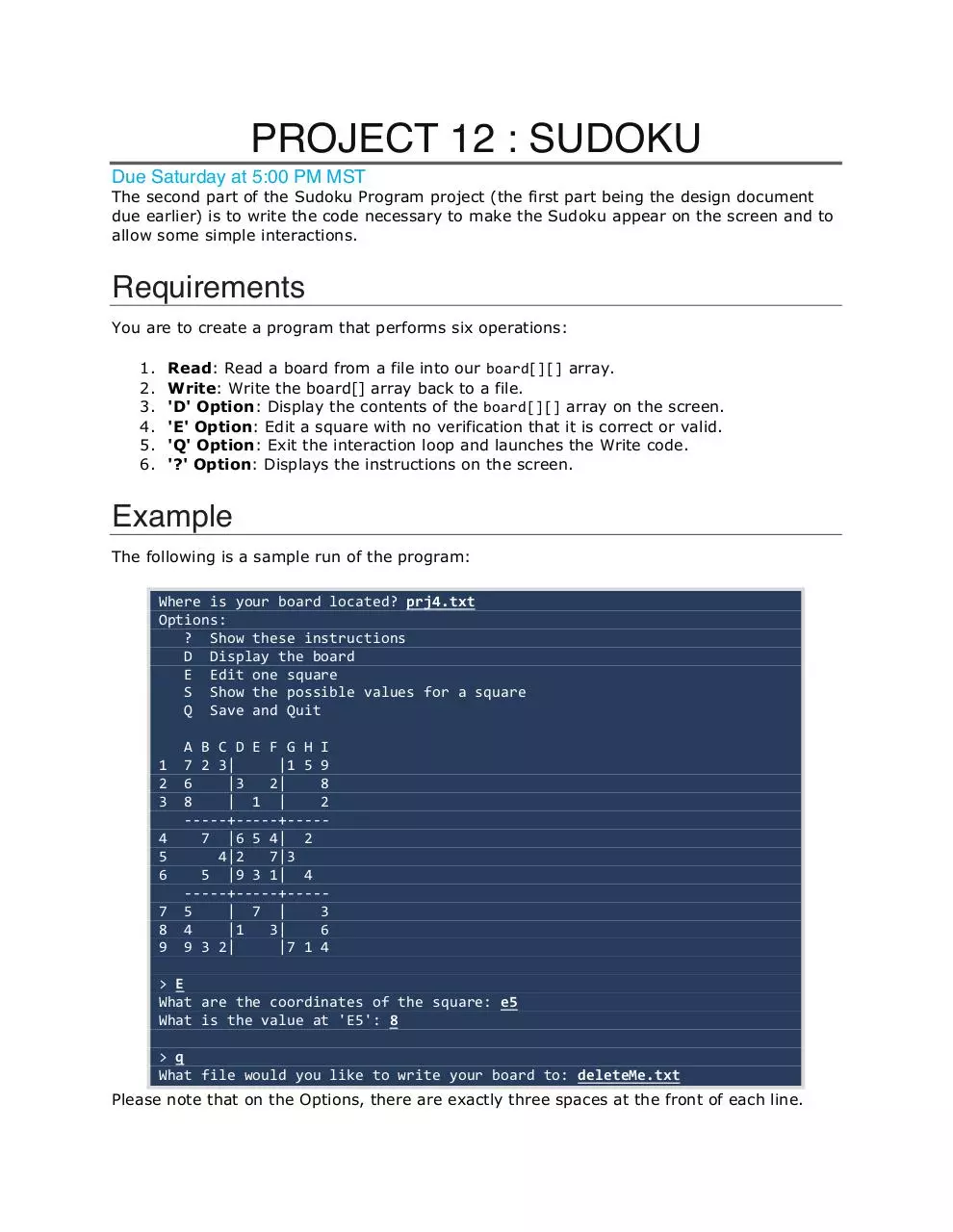
The following is a sample run of the program:
Where is your board located? prj4.txt
Options:
? Show these instructions
D Display the board
E Edit one square
S Show the possible values for a square
Q Save and Quit
1
2
3
4
5
6
7
8
9
A B C D E F G H I
7 2 3|
|1 5 9
6
|3
2|
8
8
| 1 |
2
-----+-----+----7 |6 5 4| 2
4|2
7|3
5 |9 3 1| 4
-----+-----+----5
| 7 |
3
4
|1
3|
6
9 3 2|
|7 1 4
> E
What are the coordinates of the square: e5
What is the value at 'E5': 8
> q
What file would you like to write your board to: deleteMe.txt
Please note that on the Options, there are exactly three spaces at the front of each line.
�
Process
Perhaps the easiest way to do this is in a four-step process:
1. Create the framework for the program using stub functions based on the structure
chart from your design document.
2. Write each function. Test them individually before "hooking them up" to the rest of
the program.
3. Verify your solution with testBed:
�
 Historical archive . public document