DocuSign Instructions
When multiple signatories to a document are required
Each signer will receive the document separately to review and sign. All signers of the document will receive
an email with a link to the fully signed document once the signature process has been completed.
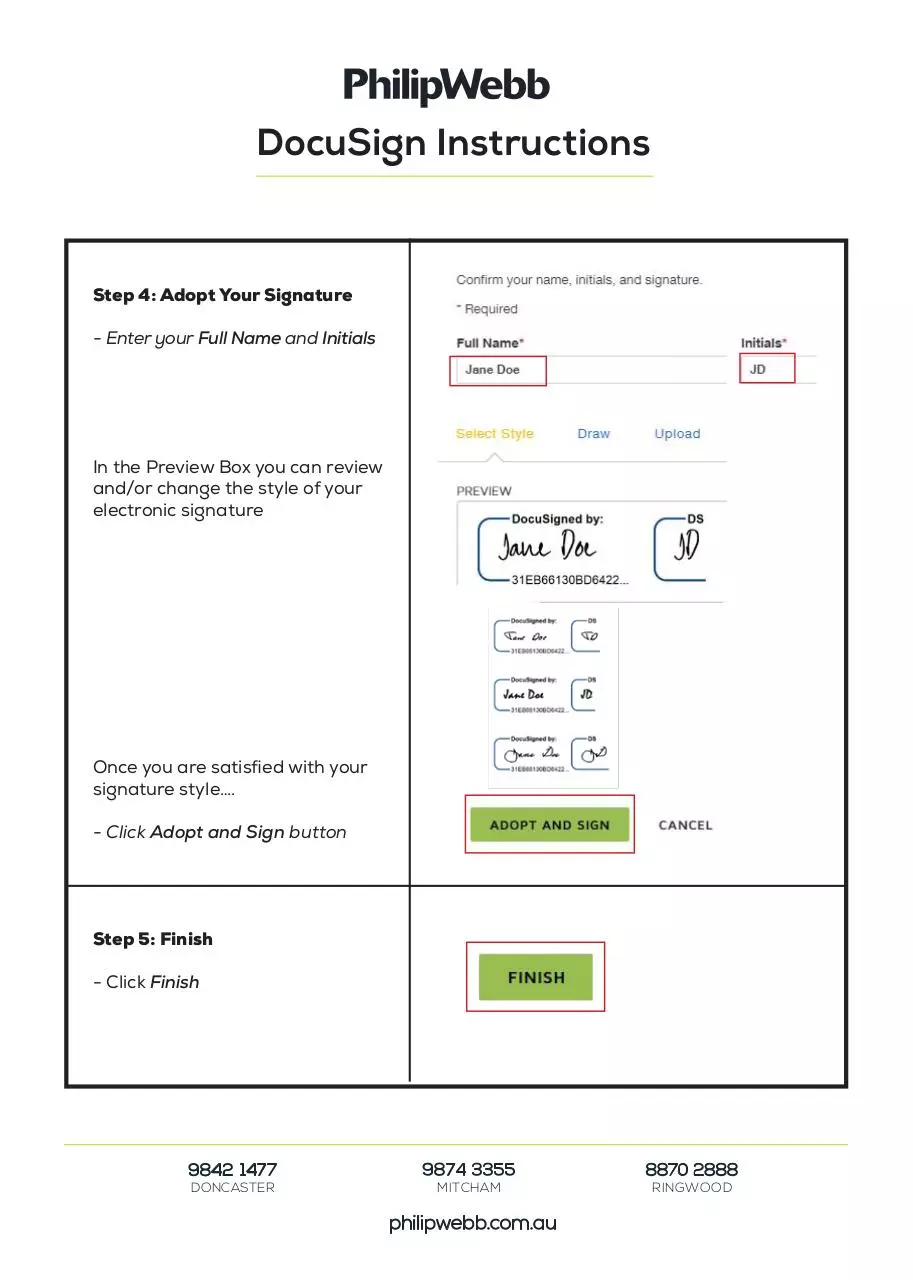
Step 1: DocuSign Email
- Click on Review Document
Step 2: Review Document
- Click Continue
Here you can review every page of
your document
- Click Finish
Step 3: Signature Page
- Click Sign icon
9842 1477
DONCASTER
9874 3355
MITCHAM
philipwebb.com.au
8870 2888
RINGWOOD
�
DocuSign Instructions
Step 4: Adopt Your Signature
- Enter your Full Name and Initials
In the Preview Box you can review
and/or change the style of your
electronic signature
Once you are satisfied with your
signature style….
- Click Adopt and Sign button
Step 5: Finish
- Click Finish
9842 1477
DONCASTER
9874 3355
MITCHAM
philipwebb.com.au
8870 2888
RINGWOOD
�
 Historical archive . public document