Your documents,
filed by project.
One folder per project, keywords that cut across them, and a search that reaches inside the documents themselves. On servers in France.
- filing.unitone folder per project
- filing.keywordsacross projects
- filing.searchinside the documents
- filing.exitthe folder, as one archive
Three years later, the same question
“Which folder was that in?”
A filing system kept by hand lasts six months. After that documents pile up wherever they landed, and tidying becomes a chore you put off.
“The quote is here, the invoice somewhere else”
The pieces of one project end up spread between the computer, the mailbox and an external drive. No view brings them together.
“I know it is written in there”
You remember a sentence, an amount, a name. Not the name of the file, which is probably called scan_0042.
The project as the unit of filing
One folder per project
A name, a description, an icon and a colour. The folders you go to often sit at the top of the list, the others wait their turn. All the features →
Keywords that cut across projects
A document lives in one folder, but it carries as many keywords as you want: the client, the year, the type of document. A folder can offer its own keywords at every upload.
A search that reads the documents
The name, the keywords, the description, the PDF properties, and the text inside the document itself. You search for a sentence you remember, and that is enough.
A project shared with somebody
Invite a partner or a client onto one folder. They see that folder, and nothing else of your archive.
The documents that come from other people
Your drop page collects the documents of a client or a supplier, without them creating an account. You file them into the right project afterwards. Open a drop page →
A project that comes back out whole
You take a complete folder back as one archive, with an inventory carrying the keywords, the descriptions and the fingerprints. Your documents are never locked in. What our archiving guarantees →
One folder, several keywords, one search
The whole method fits in one sentence, and it is the reason there are no subfolders.
The folder files it, the keyword finds it
A tree forces you to pick a branch at the moment of upload, and that choice ages badly. Here the document goes into the folder for the project, and its keywords make it visible from every angle: the client, the year, the type of document. Search, meanwhile, reaches down into the text of the document.
What you see when you open it
The folders of the demonstration archive, captured exactly as they stand in the account area.
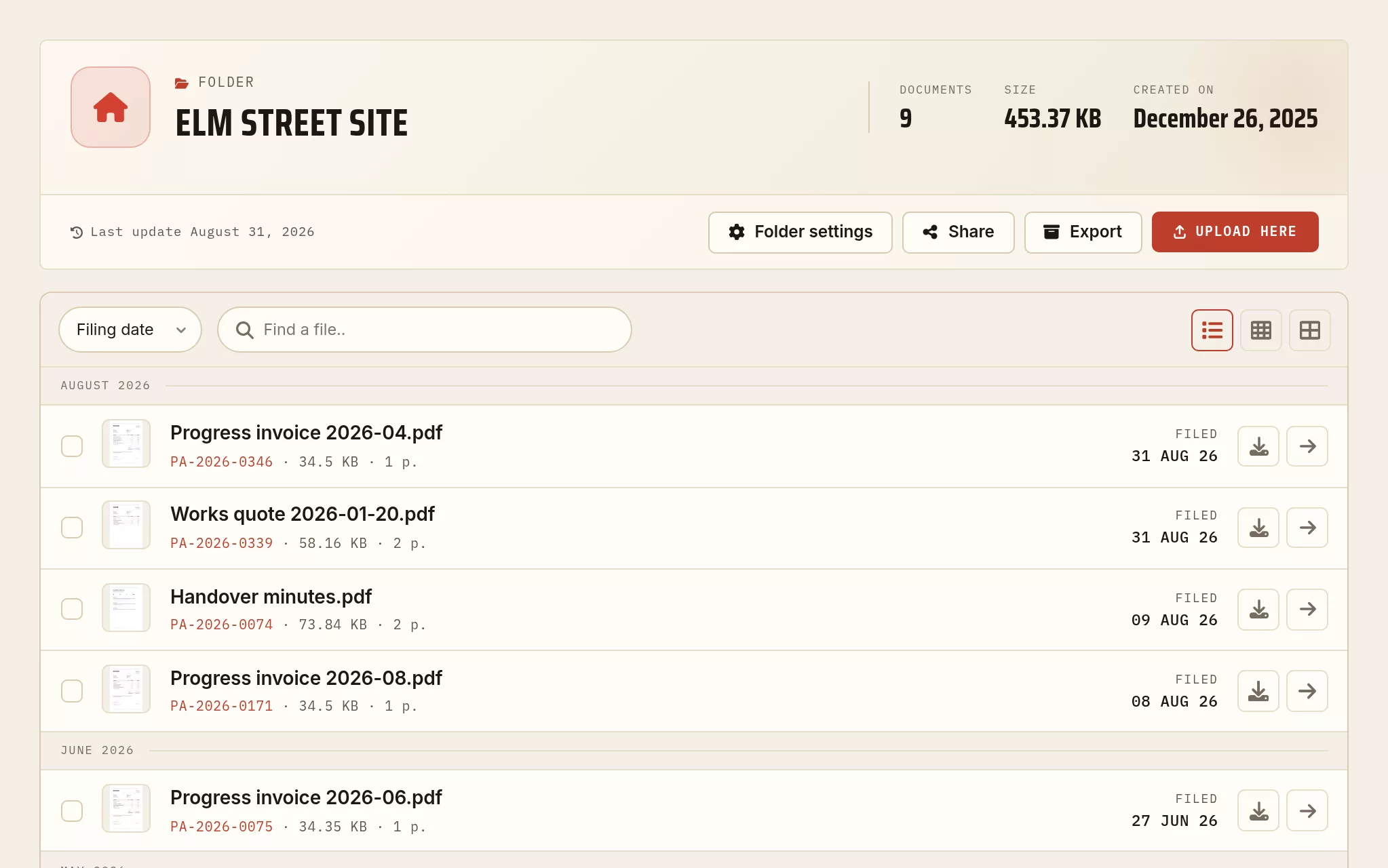
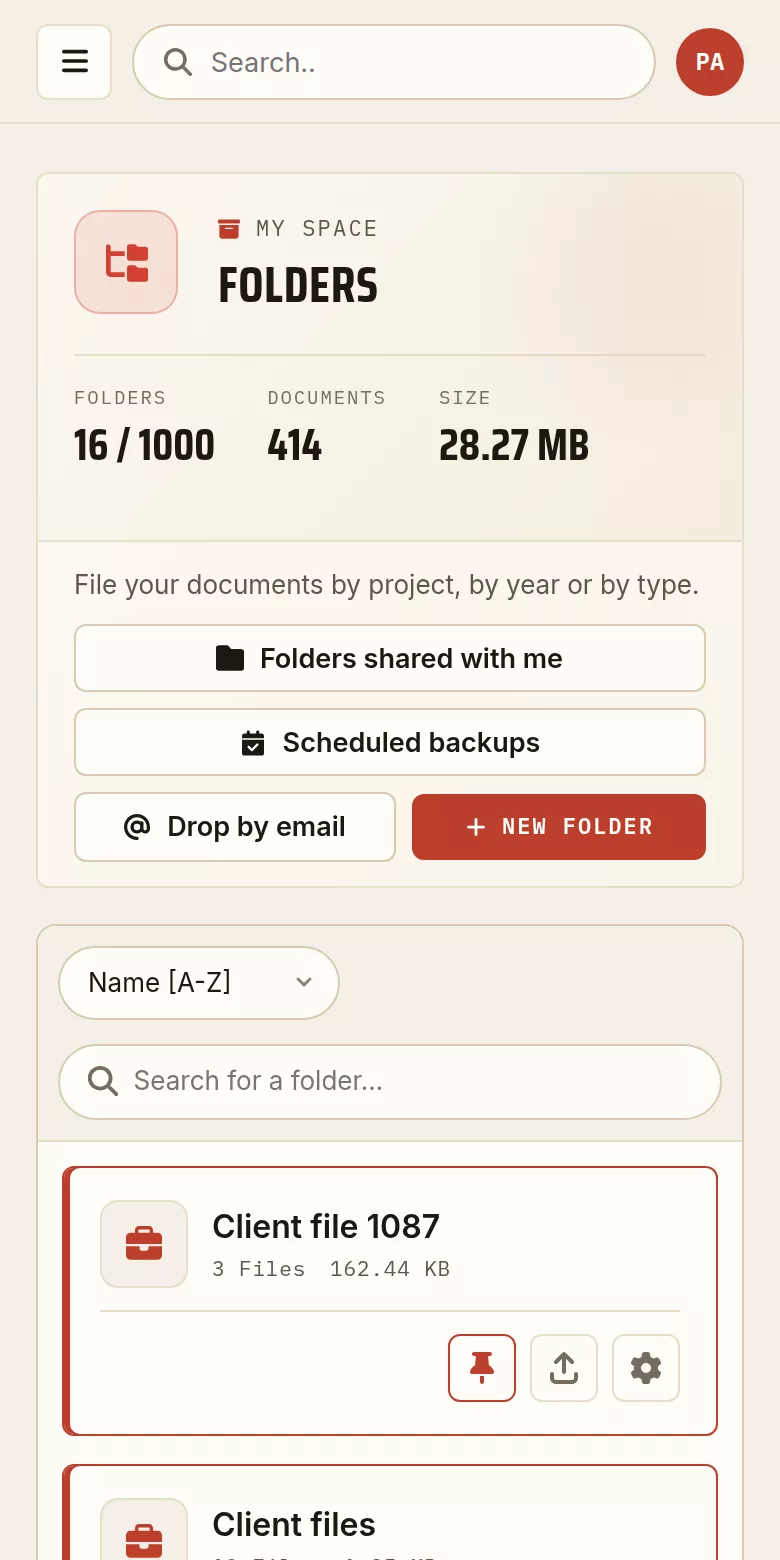
A shared project, seen by the guest
The partner, the client or the accountant opens that folder and nothing else of your archive.

Three steps
One folder per project
Create it in one click, give it a colour, set the keywords it will apply.
Upload as you go
Every document arrives dated, in the right folder, with the project keywords already offered.
Find without digging
By the name, by a keyword, or by a sentence written inside the document.
What people ask us
Can I create subfolders?
No. A document belongs to one folder and one only, and folders do not nest. That is a choice: past two levels, a tree forces you to pick a branch at every upload, and that choice ages badly. Keywords do the work people expect from subfolders, and they do it better, because a document can carry several: the same contract belongs at once to the client, to the year and to the type of document.
Can a document belong to two projects?
Not to two folders, but it can carry the keywords of both projects, and it then comes up in both searches. That is what replaces filing something twice, without duplicating the file or having to decide which of the two copies is authoritative.
Does the search go inside the content of documents?
Yes. The text of documents is indexed, in addition to the name, the keywords, the description and the PDF properties. So you can search for a sentence you remember, even if the file name says nothing.
Can I share a project with a client or a partner?
Yes, folder by folder, by invitation. The person invited sees that folder, and only that folder. To pass on a single document, a share link is enough, and it can be password protected and given an end date.
How do I get a whole project back?
You ask for the archive of the folder and you download it. It contains the documents and an inventory carrying their keywords, their descriptions and their fingerprints: the metadata travels with the files, otherwise the archive is no longer verifiable once it has left the service.
Can I send a document to my archive by email?
Yes. Your account has a drop address: you forward the message, the attachment arrives in your archive, and you file it into the project you want. Handy for the invoices that only ever arrive by email.
Putting files in order before filing them
Bring together what belongs together, separate what was scanned in one go, and correct the title and the author written inside the file.
To go further
How long should you keep invoices and contracts?
Legal retention periods in five countries, each with its official source, and a filing method that survives all of them.
Read the article → ToolsMerge, split, compress: choosing the right PDF tool
A short note to pick the right operation for what you actually need.
Read the article → LegalThe evidential value of a dated PDF
Timestamping, integrity, admissibility: what a dated upload really proves, and where it stops.
Read the article →Every guide is in the journal of the archive.