Your presentation,
as one link.
Read in the browser, with no attachment and no version in circulation. With a password, an end date or a single use, if that is what the document calls for. On servers in France.
- share.readingin the browser
- share.downloadyours to allow
- share.closingpassword · end date · single use
- share.counterviews & downloads
What an attachment does badly
Too heavy for an email
A presentation with visuals quickly goes past the limit of the server at the other end. The message bounces, or worse, it goes out without anybody knowing it never arrived.
Three versions in circulation
An attachment duplicates itself at every forward. On the day of the meeting nobody knows which one is right, and two people comment on different figures.
No idea what has been read
An email sent only proves that it left. With no counter, you find out in the meeting that the pack was never opened.
A delivery you still control afterwards
It is read in the browser
Your recipient opens the link and scrolls through the pages. Nothing to install, nothing to download, and it works as well on a phone in a corridor as on a meeting room screen.
With no download button
A tick box removes downloading from the reading page: the presentation is read, it does not go back out as an attachment into another mailbox.
Password, end date, single use
Protect the link with a password, give it an end date, or set it to single use: it then closes after the first download. Links that never expire are part of a paid tier. See the pricing →
You see whether it was opened
The number of views and downloads is shown next to the share. No name, no tracking: a counter, which is enough to know whether the pack was read before the meeting.
Embeddable in a page
A snippet to paste puts the presentation directly into your site, your intranet or a project page. The document stays with you, and you replace it without touching the page.
And a QR code, if it is printed
The paper programme carries the QR code, the QR code opens the presentation, and you can change the version shown after printing. Permanent QR codes →
Read only, or downloadable
What you set at the moment of sharing, and what it does to the reading page.
What your recipient can do
A presentation commented on in a meeting does not need to leave as a file: the reading page is enough, and the download button can be taken off it. A pack passed on for archiving, on the other hand, has to be downloadable. The password and the end date apply to both, and the published copy stays frozen and dated: what your recipient read matches a precise state.
The link, and the shape you give it
What you set when you create the link, on a demonstration account. Nothing is retouched.
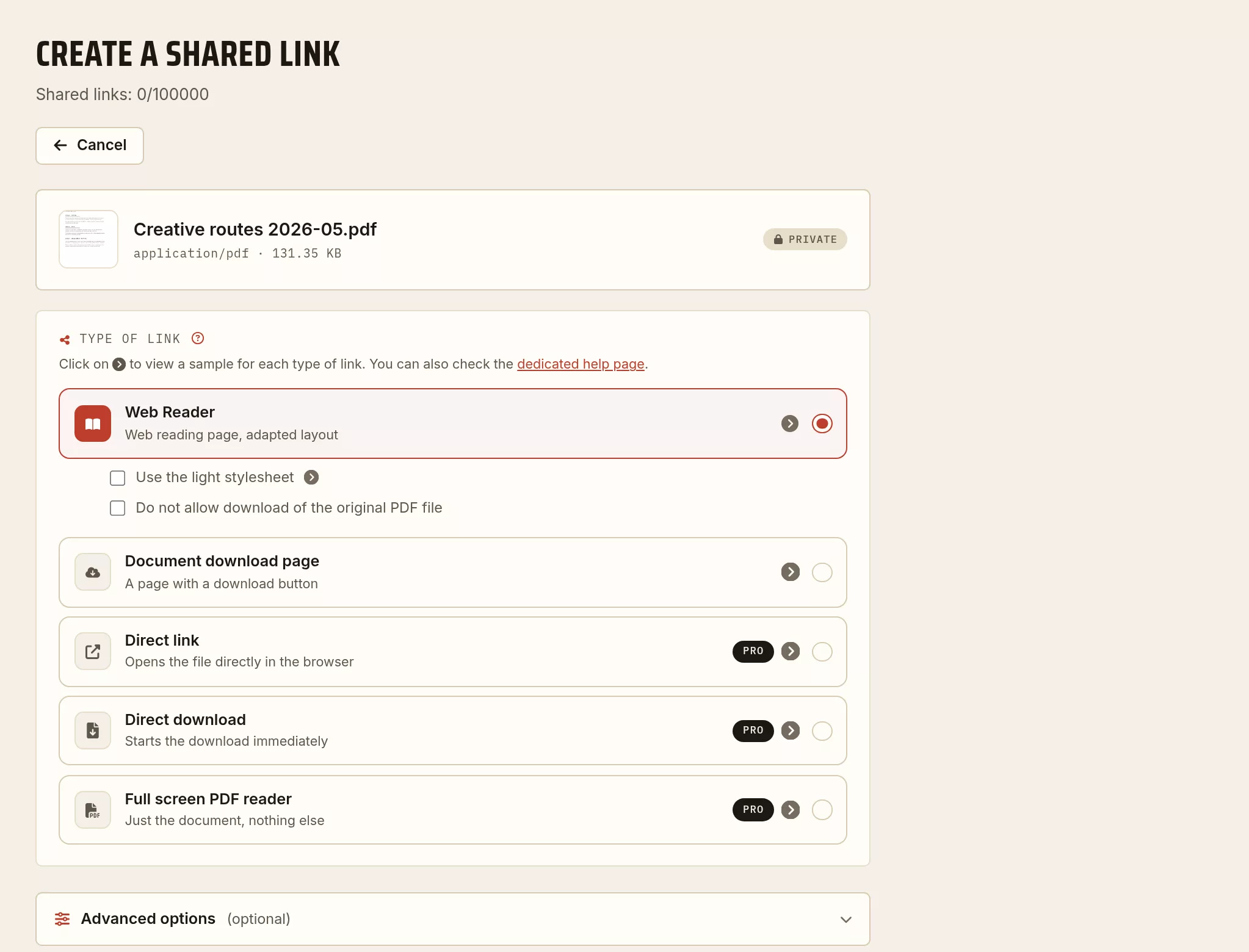
Three steps
Upload the PDF
Your presentation enters your archive, dated, and stays there after the meeting.
Choose the shape of the link
Read online or download, with or without a password, with or without an end date.
Send the link
By email, by message, in a calendar invitation or on a QR code. The link stays yours: you can close it.
What people ask us
Does my recipient have to create an account?
No. They open the link in their browser and read the presentation, on a computer as much as on a phone. Nothing to install, no sign up, no application to accept.
Does preventing downloading really stop somebody copying my presentation?
No, and it is better to know that before relying on it. The option removes the download button from the reading page, which stops a version wandering off as an attachment. It does not prevent a screenshot, nor somebody photographing their screen. It is a way of keeping distribution tidy. Somebody determined will get past it, and nobody can honestly promise you otherwise.
Can I replace the presentation after sending it?
A share carries the version you published, frozen and dated: that is what lets you know what your recipient actually read. To circulate a corrected version, you publish the new one and close the old one. If the link has to stay the same because it is printed somewhere, use a QR code, whose destination changes without touching the printed matter.
How long does the link stay active?
You decide at the moment of sharing: an hour, a day, a week, and up to a long period or no expiry at all on a paid tier. You can also set it to single use, in which case it closes by itself after the first download. And you can close a share at any time, without waiting for its end date.
Could my presentation end up in search engines?
No, unless you ask for it. A share is created not indexed, and permission to index is a separate setting, part of a paid tier. A password protected share is never indexed, whatever that setting says.
Can I put it straight into a page of my site?
Yes, a snippet to paste comes with the share. The presentation appears in your page, the file stays hosted here, and you can change what is shown without modifying your site.
Getting the presentation ready before sending it
Bring down a deck loaded with images, mark the version that circulates, and put a QR code on it that leads back to the share page.
To go further
The evidential value of a dated PDF
Timestamping, integrity, admissibility: what a dated upload really proves, and where it stops.
Read the article → ToolsMerge, split, compress: choosing the right PDF tool
A short note to pick the right operation for what you actually need.
Read the article → SignatureHow to sign a document (signature, initials, stamp)
A text stamp or an image placed by drag and drop, a SHA-512 fingerprint: how to do it, and where it stops.
Read the article →Every guide is in the journal of the archive.